> For the complete documentation index, see [llms.txt](https://docs.nexthink.com/llms.txt). Markdown versions of documentation pages are available by appending `.md` to page URLs; this page is available as [Markdown](https://docs.nexthink.com/platform/ja/user-guide/ai-tools/working-with-ai-tools.md).
# AI ツールの監視
AIツールがAdoptされ、使用され、組織全体でどのように認識されているかをご確認ください。 AI Tools のダッシュボードは、運用データと従業員の Sentiment を組み合わせて、AI 導入の最適化と拡大を支援します。
AI ツールを使い始めるには:
* 以下の [#key-ai-tools-concepts](#key-ai-tools-concepts "mention") の概念を確認してください。
* AI の採用状況を監視し、従業員 Experience を分析する方法に関するガイドをご覧ください:
* [AI 導入のモニタリング](/platform/ja/user-guide/ai-tools/working-with-ai-tools/monitoring-ai-adoption.md)
* [特定のAIツールの導入状況を監視する](/platform/ja/user-guide/ai-tools/working-with-ai-tools/monitoring-ai-adoption-specific-tool.md)
* [AI導入目標](/platform/ja/user-guide/ai-tools/working-with-ai-tools/ai-adoption-goals.md)
* 検出された AI ツールにガバナンスポリシーを割り当てる方法については、ガイドを参照してください。
* [AI ツールのガバナンス](/platform/ja/user-guide/ai-tools/governing-ai-tools.md)
{% hint style="warning" %}
Nexthink 管理者は、AI ツールの正しい構成とモニタリングを確保し、スムーズなオンボーディングを実現するために、まずすべての**技術要件**を満たす必要があります。 [AI ツールのセットアップと管理](/platform/ja/user-guide/ai-tools/setting-up-and-managing-ai-tools.md#before-you-begin) を参照してください。
{% endhint %}
## 主要な AI ツール モニタリングの概念
### AI ツール向けのデータ収集
AI Tools は、複数の Nexthink コンポーネントからデータを収集し、AI ツールの利用状況を監視して実行可能なインサイトを提供します。
* **Nexthink ブラウザー拡張機能:** ChatGPT などのツールの Web ベースの使用状況を追跡します。導入傾向を把握するために必要です。
* **Collector:** エンドポイントのテレメトリーを収集し、`focus_time` や Nexthink キャンペーンの応答を含みます。 AI ツール向けの組み込みフィードバックキャンペーンをサポートするには、Collector バージョン `25.5.1` 以降が必要です。
* **Microsoft Copilot 用のインバウンドコネクタ:** Outlook、PowerPoint、Teams などのアプリケーション全体での Microsoft Copilot の使用パターンを監視します。
これらのソースを組み合わせることで、AI Tools ダッシュボードに、利用状況、Sentiment、生産性への影響に関する可視性を提供します。
{% hint style="info" %}
Microsoft Copilot 固有のデータ収集に関する詳細については、[API 資格情報を使用した Microsoft Copilot の構成](/platform/ja/user-guide/ai-tools/setting-up-and-managing-ai-tools/configuring-ai-tools/configuring-microsoft-copilot-using-api-credentials.md#configuring-the-tool-in-the-nexthink-web-interface) を参照してください。
{% endhint %}
***
### お使いの環境における AI ツールのアクティビティの検出
システムは、ChatGPT、Claude、Gemini などの事前構成された AI ツールの導入状況を、トラフィックパターンの認識やエンドポイントのアクティビティを通じて自動的に監視します。
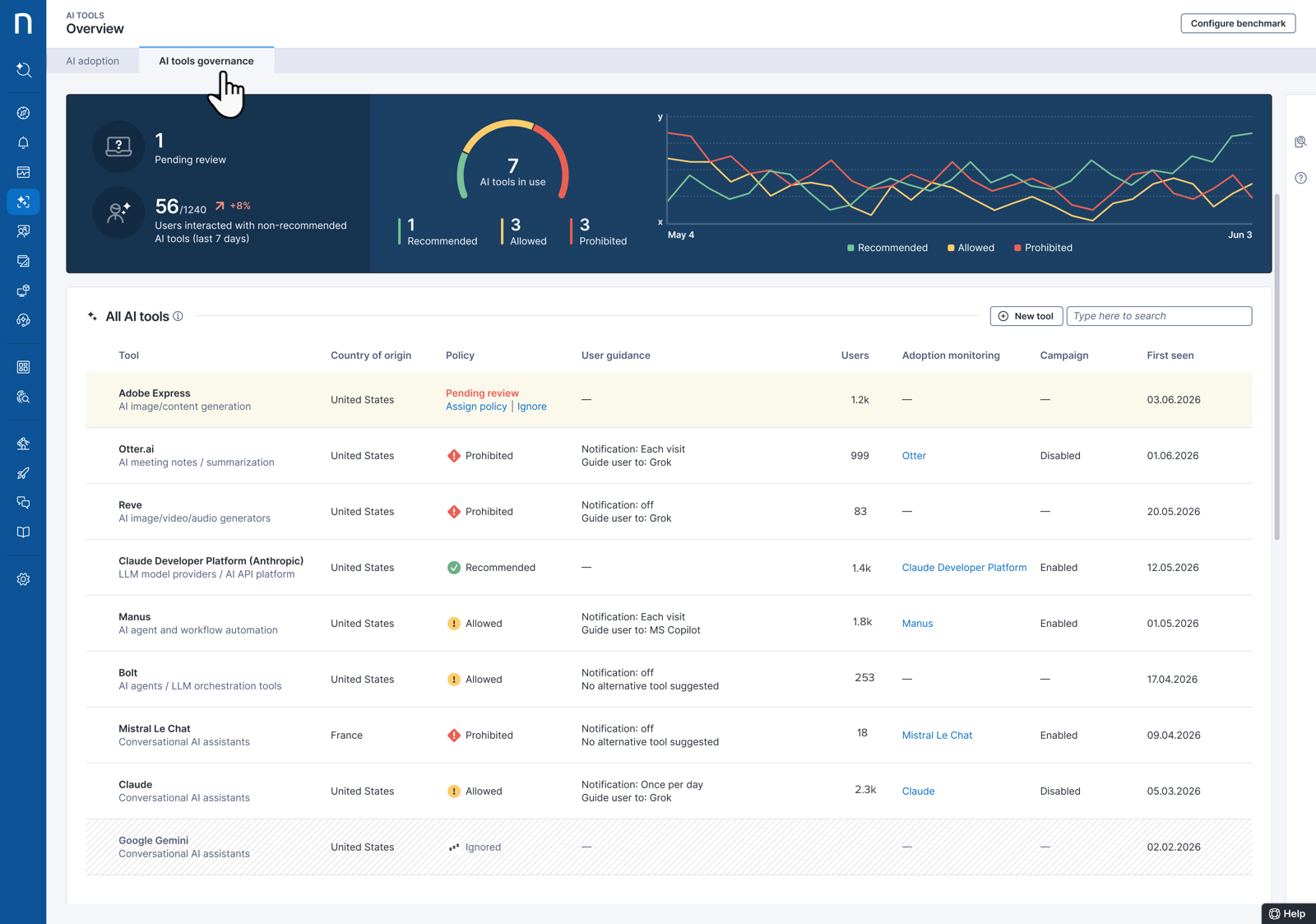
しかし、システムは `connection.events` データに基づいて、従業員が使用するすべての AI ツールも検出します。 Nexthink は観測されたドメインをマッピングし、[AI ガバナンス](/platform/ja/user-guide/ai-tools/governing-ai-tools.md) タブの下に検出された AI ツールを自動的に表示します。
透明プロキシ(例: Cisco Secure Web Gateway)の背後では、HTTPS トラフィックが少数のプロキシ IP で終端されるため、Collector は実際のドメインを報告する代わりに接続を 1 つの `multiple domain names` イベントにまとめます。この動作は、AI ツールの検出および使用状況のレポートに影響を与える可能性があります。
ドメイン名の報告の詳細については、[Troubleshooting application connectivity](https://docs.nexthink.com/platform/ja/solutions/troubleshooting-application-connectivity#domain-name-reporting) ドキュメントを参照してください。
{% hint style="info" %}
Nexthink は、元のツールドメイン(例: `chatgpt.com`)が可視である限り、VPN 経由での AI ツール使用を検出します。システムは、実際のドメインをマスクする Zscaler Browser Isolation を経由した使用を検出しません。
{% endhint %}
***
### 従業員ごとのAI関与時間の推定
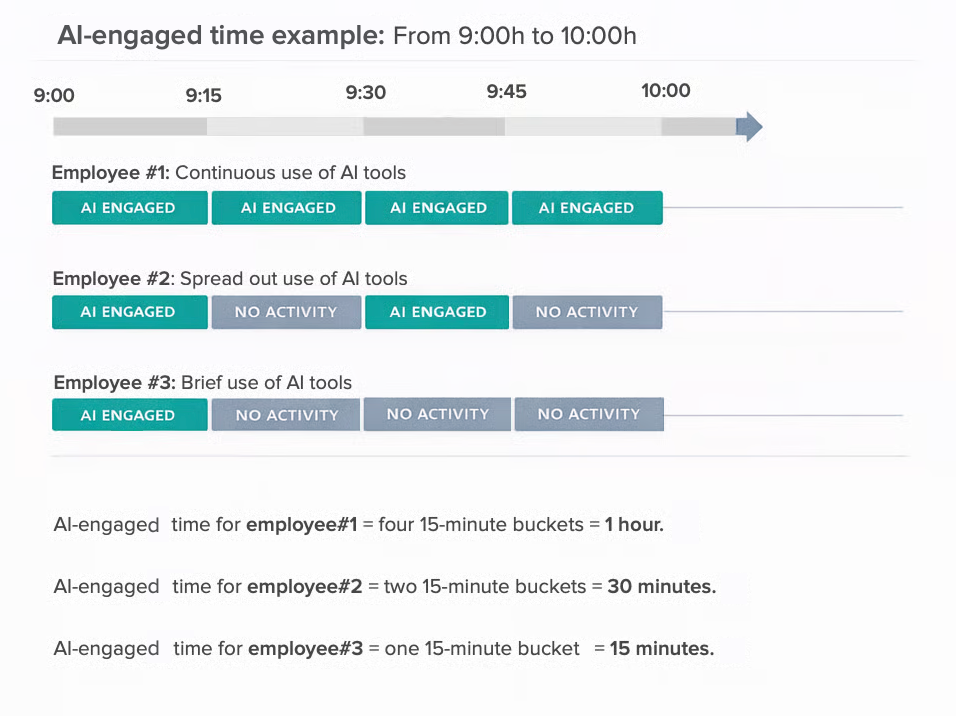
システムは、従業員ごとのAI使用時間を**15分間隔**(バケット)で推定します。
* 15分間の区切り内でAIツールを使用または操作した場合、その15分間がAI使用時間として計上されます。
* 同じ時間枠内で AI と複数回やり取りしても、1 つの15分単位としてカウントされます。
したがって、AI ツールを短時間または断続的に使用していても、週全体では大きな合計になる可能性があります。**以下の例**をご覧ください。
{% hint style="info" %}
この**15 分間隔**は、AI ツールの分単位の厳密な使用時間を測定するためではなく、従業員が日々の業務において AI をどの程度採用し、統合しているかを捉えることを目的としています。
システムは、ユーザーとツールの会話に入力された各ユーザーのプロンプトにつき、1 件のインタラクションを記録します。
{% endhint %}
***
### AI ツールの可視化とインサイト
AI Tools は、さまざまなダッシュボードタイプを通じて、AI の導入とガバナンスに関する体系的な可視性を提供します。
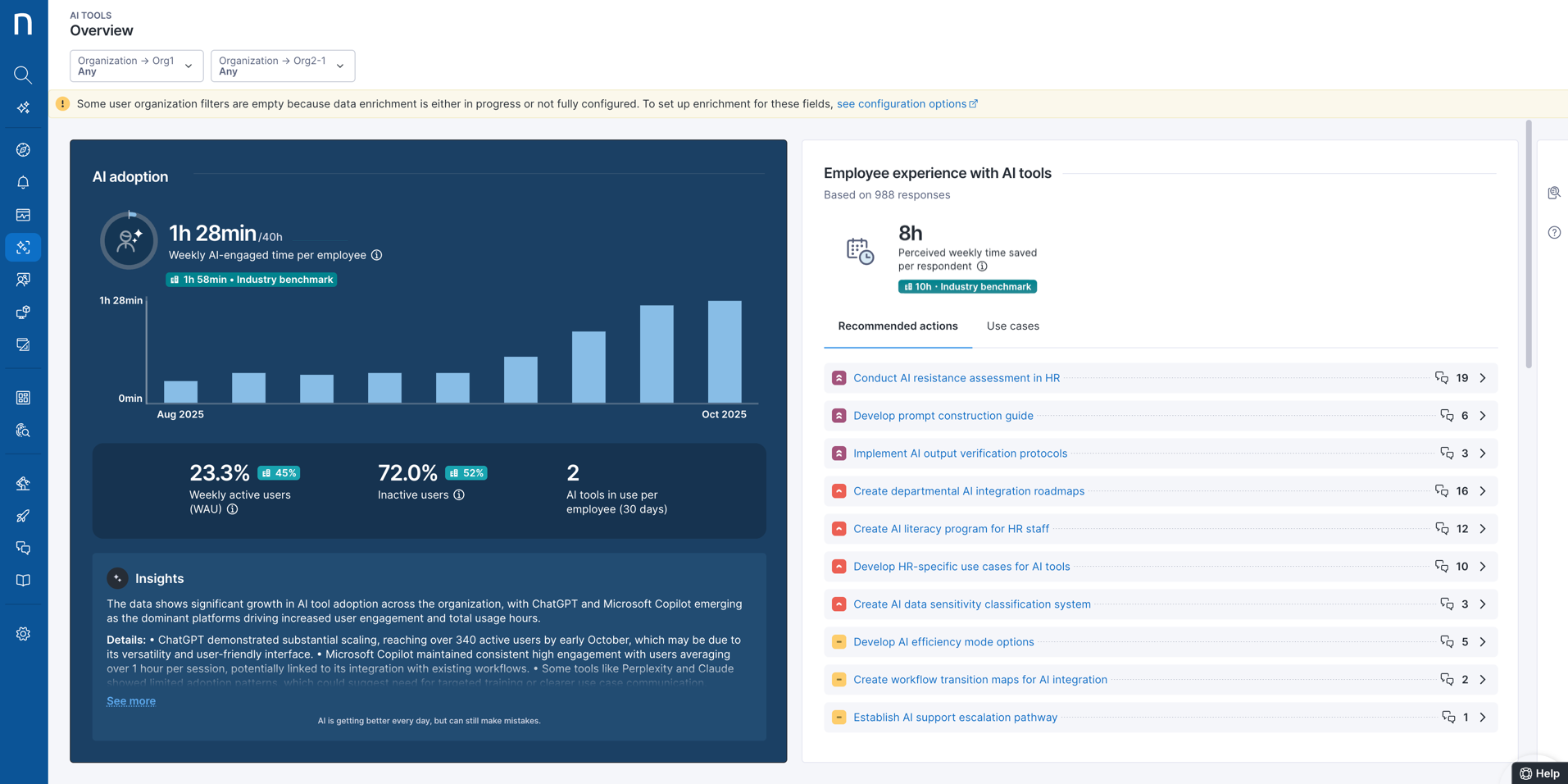
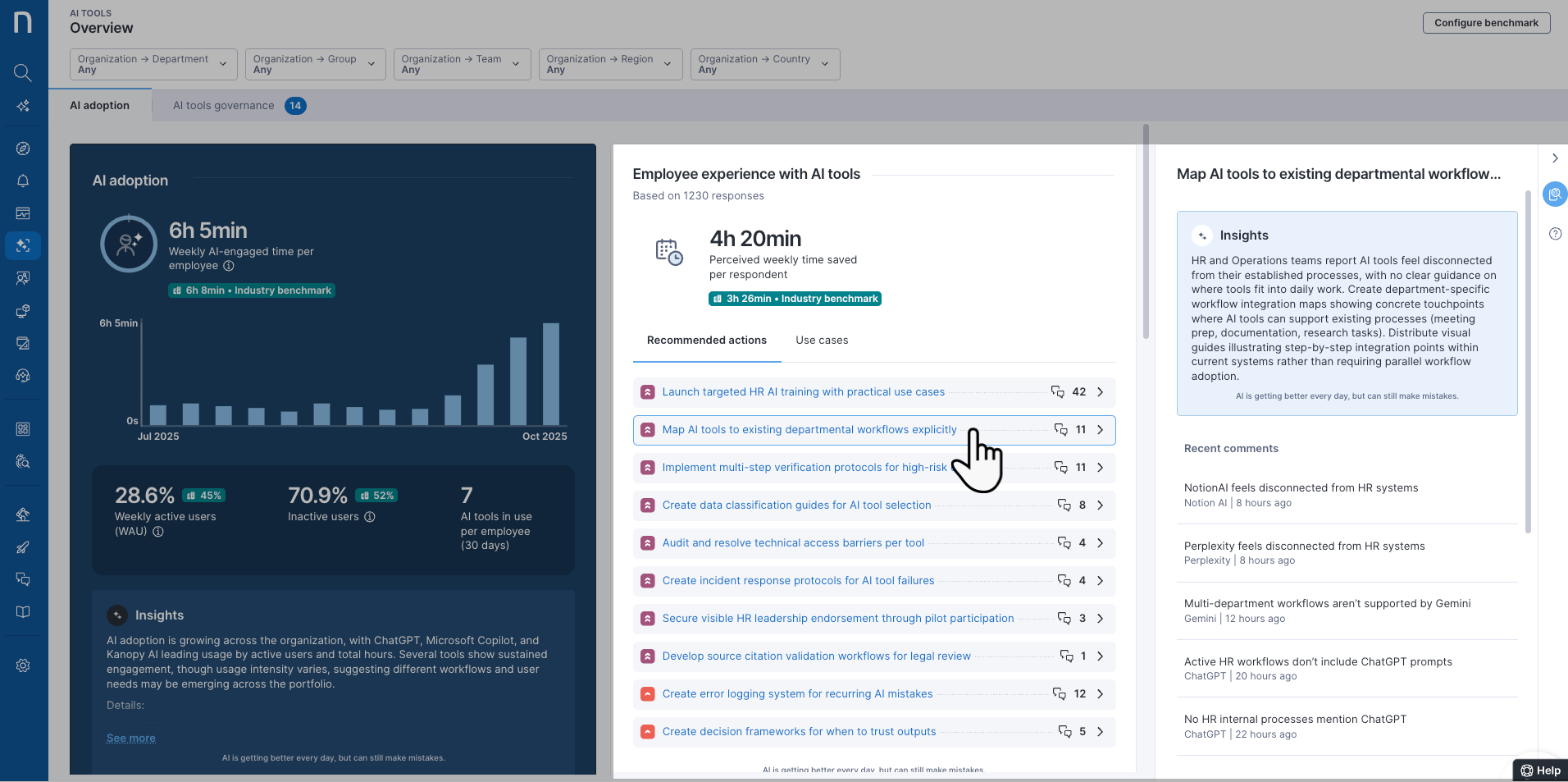
* IT リーダー、AI 導入チーム、部門横断のステークホルダー向けに設計された [AI adoption](/platform/ja/user-guide/ai-tools/working-with-ai-tools/monitoring-ai-adoption.md) ダッシュボードは、利用傾向、ベンチマーク、時間短縮、従業員の認識、そして **AI-powered insights** を含む、組織全体の AI 導入状況と Sentiment を示します。
* [特定のツール](/platform/ja/user-guide/ai-tools/working-with-ai-tools/monitoring-ai-adoption-specific-tool.md)向けのダッシュボードは、プロダクトオーナーやエネーブルメントチームを対象としており、個々の AI ツールに着目して、アプリケーションごとの詳細なエンゲージメント、従業員のExperience、インタラクショントレンドを提示し、ツールレベルでの採用を支援します。これには、**AI-powered recomendations** や従業員フィードバック分析が含まれます。
* [AI governance](/platform/ja/user-guide/ai-tools/governing-ai-tools.md) ダッシュボードには、承認済みおよびシャドー AI ツールが環境内に表示され、各 AI ベースのアプリケーションに割り当てられたガバナンスポリシー、またはガバナンスが保留中の場合はその現在のステータスが表示されます。
これらのビューを組み合わせることで、AI トランスフォーメーションに向けた戦略的な管理と運用面での有効化を推進できます — その中には、[AI ツールによる従業員 Experience の向上](/platform/ja/user-guide/ai-tools/working-with-ai-tools/monitoring-ai-adoption.md#monitoring-employee-experience-with-ai-tools) も含まれます。
{% hint style="info" %}
システムは、AI生成コンテンツまたは**インサイト**を示すために✦ スパークルアイコンを表示します。 AI は急速に進化し優れたインサイトを提供していますが、まだ誤りを犯すことがあります。
{% endhint %}
***
### Sentiment トラッキング用の組み込みキャンペーンコンテンツ
すべての AI 採用ダッシュボードに **AI ツールによる従業員 Experience** を表示するために、Nexthink は特定の AI ツール設定から有効化・アクティベートする必要がある組み込みキャンペーンを使用します。
システムは、以下の標準に準拠した編集不可のコンテンツを含む AI ツールキャンペーンを送信します。
各キャンペーンに含まれる質問
各キャンペーンには、**3つの質問** が含まれます。
1. *過去7日間で、`[AI tool]` によりどれくらい時間が節約できましたか?*
* オプション: 時間範囲 (*None, Less than 1h, 1-5h, 6-10h, 11-15h, 15-20h, More than 20h*)
2. *`[AI tool]` をどのようにすれば、あなたにとってより有用にできますか? また、そのために私たちができることは何ですか?* (*自由記述入力*)
3. *`[AI tool]` を使って最後に行った、または試みたことは何ですか?*(*自由記述入力*)
キャンペーン送信基準
キャンペーンは次の条件下で送信されます。
* 監視対象の AI ツールを少なくとも 1 つ積極的に使用している従業員のみがキャンペーンを受け取ります。
* 各従業員は 90 日に 1 回を上限として、使用しているツールのうち 1 つに対してのみキャンペーンを受け取ります。
* 任意の日にキャンペーンを受け取る従業員は最大 5% です。
必要に応じて、特定のユーザーをキャンペーンから除外したり、特定の AI ツールのキャンペーンを無効にしたりするために、[AI ツール向けのキャンペーン設定を変更](/platform/ja/user-guide/ai-tools/setting-up-and-managing-ai-tools/modifying-campaign-setups-for-ai-tools.md)できます。
{% hint style="warning" %}
特定の AI ツール設定からキャンペーンを無効にすると、新しい従業員は対象外となります。ただし、既に対象となっていた従業員には、回答するか、キャンセルするか、キャンペーンが期限切れになるまで、引き続きキャンペーンが配信されます。
{% endhint %}
{% hint style="warning" %}
**AI ツールによる従業員 Experience** にデータが表示されない場合、組み込みの Nexthink キャンペーンがアクティブでないか、完全に展開されていない可能性があります。アクティベーション後、データが表示されるまで最大 7 日間かかる場合があります。
問題が解決しない場合は、すべての [AI Tools requirements](https://docs.nexthink.com/platform/ja/user-guide/ai-tools/setting-up-and-managing-ai-tools#before-you-begin) を確認するよう Nexthink 管理者に連絡してください。
{% endhint %}
***
### AI 採用成果
**AI Tools** ダッシュボードを分析した後、AI ソリューションの導入結果をステークホルダーやリーダーシップに報告する必要があります。
* ライセンス/リソースの割り当てを最適化するために、従業員とAIのインタラクションの傾向を追跡します。
* AI ツールの **Insights** と **Recommended actions** に基づく提案を実施した後、従業員の反応の変化を測定します。
* 特定のAIツール向けに実施されるターゲット型コミュニケーションやトレーニングの有効性を検証する。
* ウォークスルーや [Adopt](/platform/ja/user-guide/adopt.md) ガイドが、測定可能な改善につながっているかどうかを追跡します。
最終的には、AI ツールを導入することで、具体的な価値の向上が確認できるはずです。
{% hint style="info" %}
レポートの客観性を維持するために、Nexthink のダッシュボードとインサイトを参照して、相関関係を特定し、変数を切り分けてください。こうすることで、十分な検証がないまま、成果をAIツール導入の取り組みに過度に結び付けてしまうことを避けられます。
さらに、統計的な相関指標(例:ピアソンの相関係数)や制御された比較(A/B テスト)など、エビデンスに基づくフレームワークを用いて観察内容を裏付けてください。
{% endhint %}
---
# Agent Instructions
This documentation is published with GitBook. GitBook is the documentation platform designed so that both humans and AI agents can read, navigate, and reason over technical content effectively. Learn more at gitbook.com.
## Querying This Documentation
If you need additional information that is not directly available in this page, you can query the documentation by asking a question.
Perform an HTTP GET request on the following URL with the `ask` and `goal` query parameters:
```
GET https://docs.nexthink.com/platform/ja/user-guide/ai-tools/working-with-ai-tools.md?ask=&goal=
```
`ask` is the immediate question: it should be specific, self-contained, and written in natural language.
`goal` is what the user is ultimately trying to achieve, the reason they need the answer. Sharing it helps GitBook give you a better, more relevant answer. A goal is most helpful when it describes the outcome the user wants rather than restating the question. For example, with `ask=how do I create an API token`, a goal like `automate deployments from our CI pipeline` lets GitBook tailor the answer to that use case.
The response will contain a direct answer to the question and relevant excerpts and sources from the documentation.
Use this mechanism when the answer is not explicitly present in the current page, you need clarification or additional context, or you want to retrieve related documentation sections.