> For the complete documentation index, see [llms.txt](https://docs.nexthink.com/platform/llms.txt). Markdown versions of documentation pages are available by appending `.md` to page URLs; this page is available as [Markdown](https://docs.nexthink.com/platform/ja/user-guide/administration/system-configuration/digital-experience-score-management/configuring-dex-campaign.md).
# DEXキャンペーンの設定
Sentiment データで Digital Employee Experience(DEX)スコアをサポートするには、標準化された DEX キャンペーンを設定し、[Digital Experience Management ページ](/platform/ja/user-guide/administration/system-configuration/digital-experience-score-management.md#digitalexperiencescoremanagement-configuringthesentimenttab)で選択する必要があります。このページでは、キャンペーンが一貫して確実に DEX スコアに寄与するために必要な手順について説明します。
{% stepper %}
{% step %}
**DEX スコアキャンペーンを作成する**
Nexthink Library から **Digital Experience – Sentiment** キャンペーンをインストールします。必要に応じて、そのコピーを作成するか、[#configure-campaign-content](#configure-campaign-content "mention") の手順にあるガイドラインに従って、キャンペーンを最初から作成します。
{% endstep %}
{% step %}
**キャンペーンの一般設定を構成する**
* **トリガー**方法を **スケジュール**に設定します。
* キャンペーンの優先度、翻訳、送信者の詳細をカスタマイズします。詳細については、[キャンペーンの作成と設定](/platform/ja/user-guide/campaigns/managing-campaigns/creating-campaigns.md#creatingcampaigns-general) を参照してください。
{% endstep %}
{% step %}
**キャンペーンコンテンツを構成する**
Nexthink Library からインストールした **Digital Experience – Sentiment** キャンペーンでは、設定は必要ありません。ただし、デフォルトのキャンペーンをコピーするか、最初からキャンペーンを構成する場合は、キャンペーンが **Digital Experience** と互換性を持ち、DEX スコアに正しく寄与するよう、以下のガイドラインに従う必要があります。
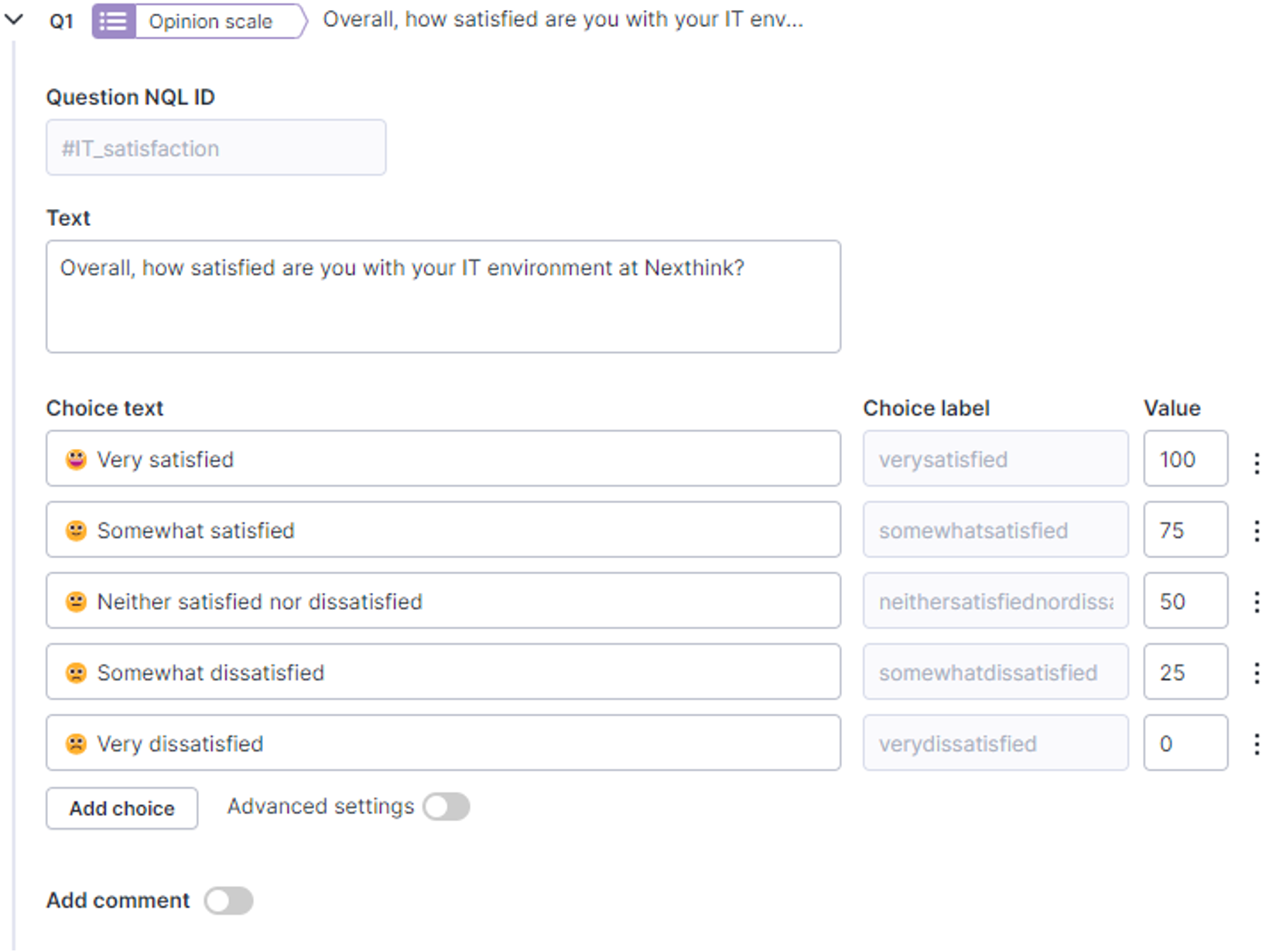
* Sentiment スコアの計算には、最初のキャンペーン質問を使用します。この質問は次の要件を満たす必要があります:
* **NQL ID** を **#it\_satisfaction** に設定する。
* 最も肯定的な値から最も否定的な値の順に並べた 5 段階の尺度を推奨する、意見尺度の質問にする。
* 次の値の範囲を持つ選択肢を設定する:
* **満足**ゲージ: 値 > 70
* **中立**ゲージ: 値が 70 未満かつ 30 超
* **不満**ゲージ: 値 < 30
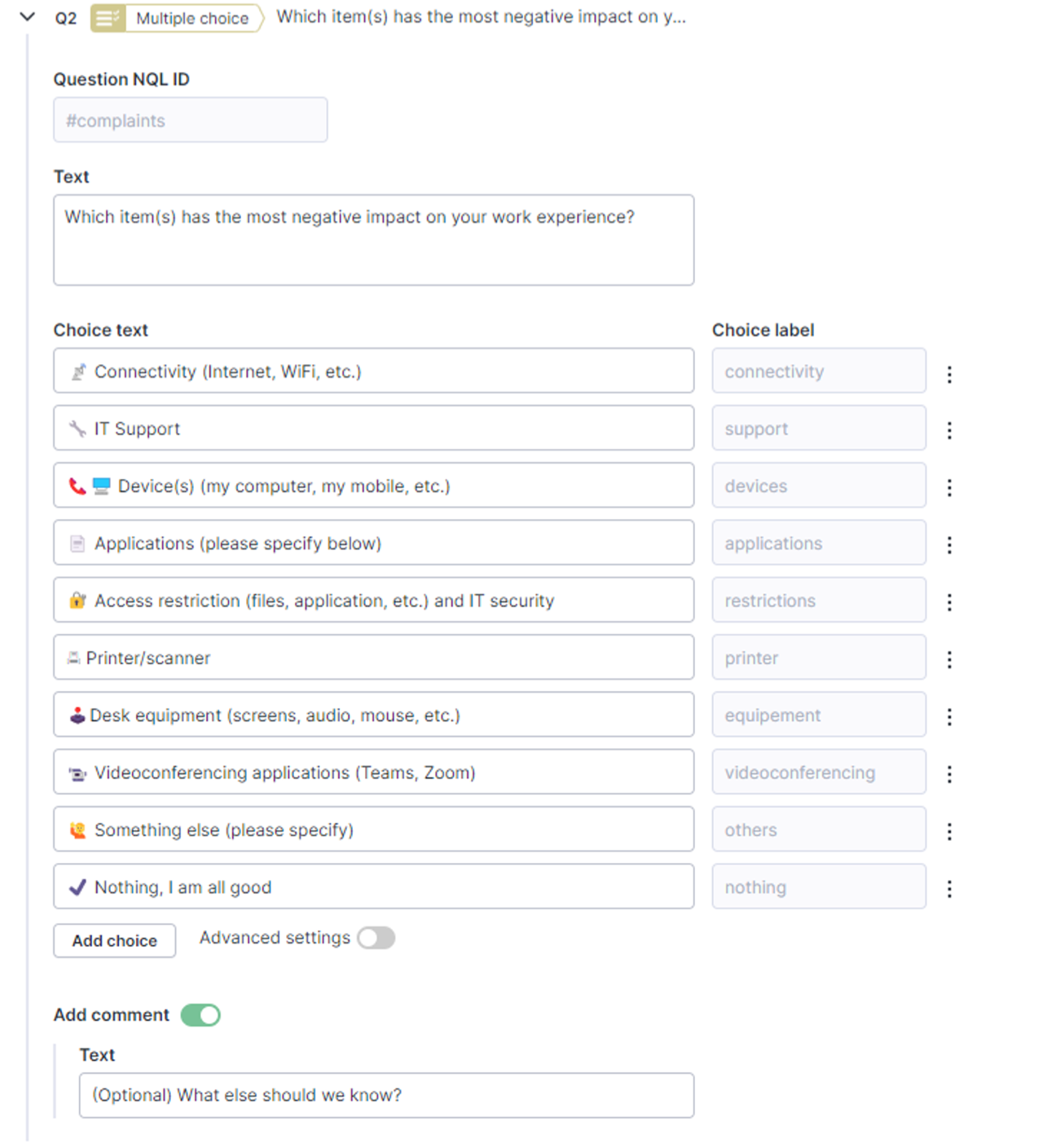
* [従業員インサイト機能](/platform/ja/user-guide/digital-experience/using-employee-insights-dashboard.md)には、2 番目のキャンペーン質問を使用します。この質問は次の要件を満たす必要があります:
* **NQL ID** を **#complaints** に設定する。
* 任意の不満のトピックを追加できる、複数選択式の質問にする。
* 少なくとも次の項目を含める:
* 選択肢ラベルを **others** に設定した、*その他(具体的にご記入ください)*。
* 選択肢ラベルを **nothing** に設定した、*特にありません、問題ありません*。
{% hint style="info" %}
リストからトピックを削除すると、Digital Experience モジュールのダッシュボードからも自動的に削除されます。これは、一部のユーザーが最近そのトピックを選択しており、その回答が Sentiment キャンペーンの表示期間内にまだある場合でも適用されます。
{% endhint %}
{% endstep %}
{% step %}
**DEX キャンペーンをスケジュールする**
NQL **ターゲティングクエリ**を指定し、**対象従業員がキャンペーンを受信する**オプションを構成します。データサンプリングを最適化し、欠落のない一貫したカバレッジを確保するために従業員を効果的にターゲット設定する方法については、詳細な手順が記載された [キャンペーンの定期スケジュール化](/platform/ja/user-guide/campaigns/managing-campaigns/creating-campaigns/scheduling-recurring-campaign.md) を参照してください。
{% endstep %}
{% step %}
**Digital Experience スコアを構成する**
[Digital Experience Score管理](/platform/ja/user-guide/administration/system-configuration/digital-experience-score-management.md) ページに移動し、DEX キャンペーンの **NQL\_ID** を入力します。
{% endstep %}
{% step %}
**DEX キャンペーンを公開する**
キャンペーンの **編集**ページまたは **キャンペーン管理**ページから DEX キャンペーンを公開します。公開後、キャンペーンは1時間ごとに Sentiment データを収集します。
{% endstep %}
{% endstepper %}
---
# Agent Instructions
This documentation is published with GitBook. GitBook is the documentation platform designed so that both humans and AI agents can read, navigate, and reason over technical content effectively. Learn more at gitbook.com.
## Querying This Documentation
If you need additional information that is not directly available in this page, you can query the documentation dynamically by asking a question.
Perform an HTTP GET request on the current page URL with the `ask` query parameter, and the optional `goal` query parameter:
```
GET https://docs.nexthink.com/platform/ja/user-guide/administration/system-configuration/digital-experience-score-management/configuring-dex-campaign.md?ask=&goal=
```
`ask` is the immediate question: it should be specific, self-contained, and written in natural language.
`goal` is optional and describes the broader end goal you are ultimately trying to accomplish on behalf of the user. GitBook uses it to tailor the answer towards what is most useful for that goal.
The response will contain a direct answer to the question and relevant excerpts and sources from the documentation.
Use this mechanism when the answer is not explicitly present in the current page, you need clarification or additional context, or you want to retrieve related documentation sections.
.png?alt=media)