> For the complete documentation index, see [llms.txt](https://docs.nexthink.com/platform/llms.txt). Markdown versions of documentation pages are available by appending `.md` to page URLs; this page is available as [Markdown](https://docs.nexthink.com/platform/ja/library-packs/security-and-compliance/secure-boot-readiness-and-compliance/configuration-guide-secure-boot-readiness-and-compliance.md).

# 設定ガイド: セキュアブートの準備状況とコンプライアンス

{% hint style="warning" %}
このページの構成オプションは[管理者](https://docs.nexthink.com/platform/ja/user-guide/administration/account-management/roles#roles-administration)のみが見ることができます。 ライブラリのコンテンツを標準ユーザーとして使用するには、[使用ガイド: セキュアブートの準備状況とコンプライアンス](/platform/ja/library-packs/security-and-compliance/secure-boot-readiness-and-compliance/usage-guide-secure-boot-readiness-and-compliance.md) を参照してください。
{% endhint %}

## **前提条件** <a href="#documentation-pre-requisites" id="documentation-pre-requisites"></a>

このライブラリパックには、以下の必要な[拡張製品](https://docs.nexthink.com/platform/ja/overview/products)のコンテンツが含まれます:

* \[なし]

## **含まれるコンテンツと依存関係** <a href="#documentation-contentanddependencies" id="documentation-contentanddependencies"></a>

このライブラリパックには、以下のコンテンツと依存関係が含まれています。

<table data-header-hidden><thead><tr><th width="174"></th><th></th><th width="174"></th><th></th></tr></thead><tbody><tr><td>コンテンツの種類</td><td>名前</td><td>説明</td><td>依存関係</td></tr><tr><td>​<a href="/pages/qVHVedGa1E7GW9DceZYD">ライブダッシュボード</a>​</td><td><strong>Secure Boot の準備状況とコンプライアンス</strong></td><td>2023 年の Secure Boot 証明書アップデートに対するデバイスの準備状況を、フリート全体でエンドツーエンドに可視化します</td><td>無し</td></tr><tr><td><a href="/pages/7AI1iiEkj53pPr8izjo1">リモートアクション</a></td><td><strong>Secure Boot コンプライアンスの詳細を取得</strong></td><td>Secure Boot、ファームウェア、UEFI 証明書のコンプライアンスを確認し、リスクのあるデバイスを特定して 2023 年のセキュリティアップデート（CVE-2023-24932）との整合性を確保します</td><td>特定のダッシュボードウィジェットにデータを入力するために必要です。</td></tr><tr><td><a href="/pages/7AI1iiEkj53pPr8izjo1">リモートアクション</a></td><td><strong>Windows テレメトリのステータスを取得</strong></td><td>Windows テレメトリレベルと関連サービスおよびタスクのステータスを確認します。</td><td>特定のダッシュボードウィジェットにデータを入力するために必要です。</td></tr></tbody></table>

### **「Secure boot readiness and compliance」パックの構成** <a href="#documentation-configurationguide" id="documentation-configurationguide"></a>

この提案された設定ステップを適応させて、組織のニーズに応じてコンテンツを編集およびカスタマイズしてください。

Skynet をシステムにインストールするための手順に従ってください:

* 設定前 - Nexthink Library からライブラリパックのコンテンツをインストールします
* [ステップ 1 - リモートアクションを設定する](#step-1-configuring-the-remote-action)

### **ステップ 1 - リモートアクションの設定**

1. メインメニューから、**Remote Actions** > [リモートアクションを管理](https://docs.nexthink.com/platform/ja/user-guide/remote-actions/managing-remote-actions) ページに移動します。
2. リモートアクションを確認して編集します。

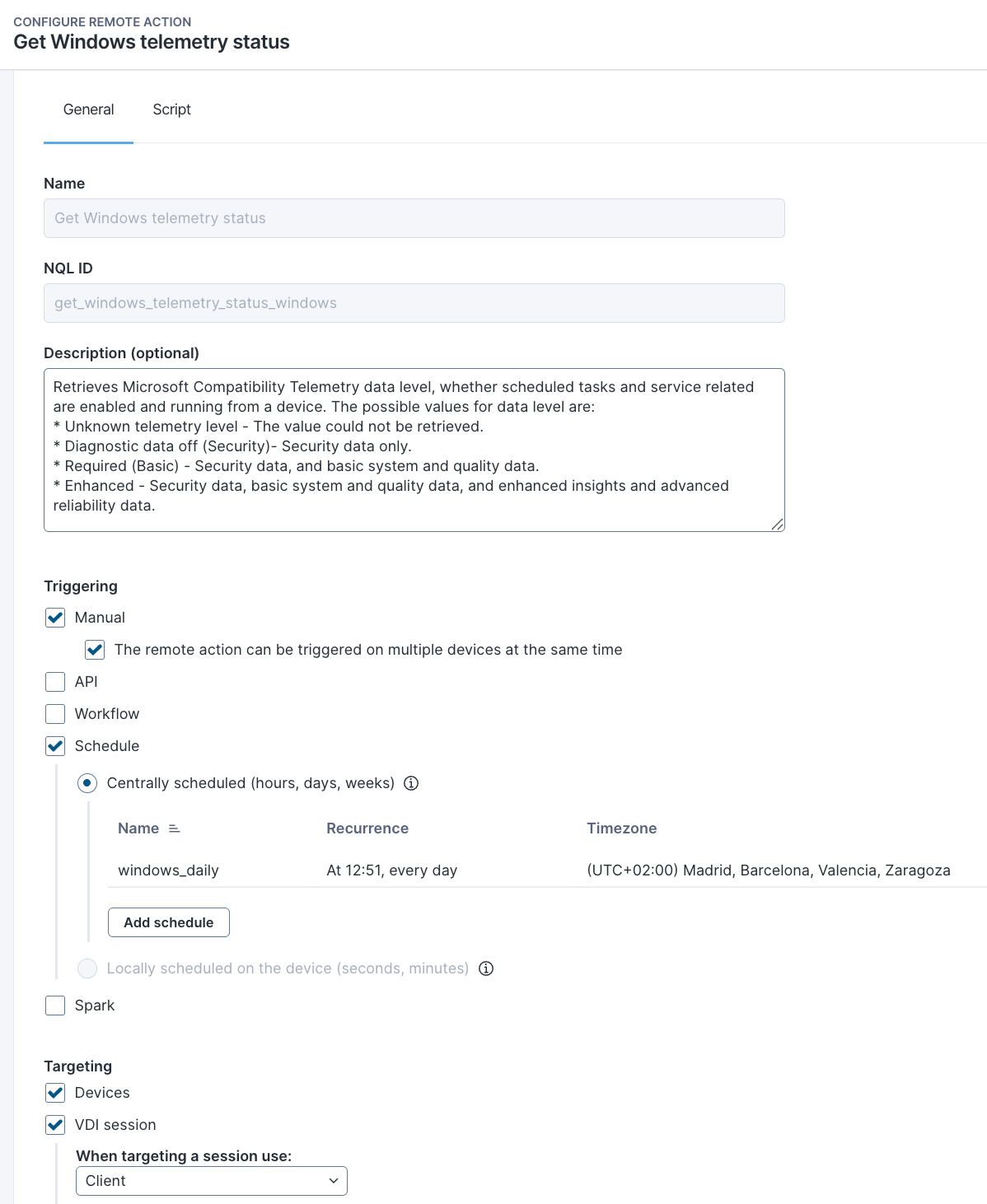
これらのリモートアクションについて、Nexthink は以下の設定を推奨します:

| 名前                             | トリガースケジュール   | 編集するパラメーター |
| ------------------------------ | ------------ | ---------- |
| **Secure Boot コンプライアンスの詳細を取得** | 毎日、スケジュール設定。 | 実行タイミングを調整 |
| **Windows テレメトリのステータスを取得**     | 毎日、スケジュール設定。 | 実行タイミングを調整 |

例:

<figure><img src="/files/MJeuUBensDBtK4rS0i2X" alt=""><figcaption></figcaption></figure>

関連トピック

* [概要ページ: Secure Boot の準備状況とコンプライアンス](/platform/ja/library-packs/security-and-compliance/secure-boot-readiness-and-compliance.md)
* [使用ガイド: Secure Boot の準備状況とコンプライアンス](/platform/ja/library-packs/security-and-compliance/secure-boot-readiness-and-compliance/usage-guide-secure-boot-readiness-and-compliance.md)
* [ライブダッシュボードを管理](https://nexthink.gitbook.io/opd/user-guide/live-dashboards/managing-live-dashboards)
* [リモートアクションを管理](https://nexthink.gitbook.io/opd/user-guide/remote-actions/managing-remote-actions)


---

# Agent Instructions
This documentation is published with GitBook. GitBook is the documentation platform designed so that both humans and AI agents can read, navigate, and reason over technical content effectively. Learn more at gitbook.com.

## Querying This Documentation
If you need additional information that is not directly available in this page, you can query the documentation dynamically by asking a question.

Perform an HTTP GET request on the current page URL with the `ask` query parameter, and the optional `goal` query parameter:

```
GET https://docs.nexthink.com/platform/ja/library-packs/security-and-compliance/secure-boot-readiness-and-compliance/configuration-guide-secure-boot-readiness-and-compliance.md?ask=<question>&goal=<endgoal>
```

`ask` is the immediate question: it should be specific, self-contained, and written in natural language.
`goal` is optional and describes the broader end goal you are ultimately trying to accomplish on behalf of the user. GitBook uses it to tailor the answer towards what is most useful for that goal.

The response will contain a direct answer to the question and relevant excerpts and sources from the documentation.

Use this mechanism when the answer is not explicitly present in the current page, you need clarification or additional context, or you want to retrieve related documentation sections.
