> For the complete documentation index, see [llms.txt](https://docs.nexthink.com/llms.txt). Markdown versions of documentation pages are available by appending `.md` to page URLs; this page is available as [Markdown](https://docs.nexthink.com/platform/ja/library-packs/applications/adopt-library-packs/guide-adoption/usage-guide-guide-adoption.md).
# 利用ガイド:ガイド採用
{% hint style="info" %}
このページには、このパックを使用するためのさまざまな方法が記載されており、使用例も含まれています。
管理者は、インストール済みコンテンツを設定およびカスタマイズするために [設定ガイド: ガイド導入](/platform/ja/library-packs/applications/adopt-library-packs/guide-adoption/configuration-guide-guide-adoption.md) を参照できます。
{% endhint %}
**ガイド採用**ライブラリパックは、EUCチームが次のことを行えるようにします:
* 公開されたガイド、手動開始、エンゲージメント、完了率、ドロップオフ、平均時間を含む導入メトリクスを追跡。
* ウォークスルー、ツールチップ、メディアガイドにおける導入トレンドを区別する。
* ガイドがアプリケーション内で最も効果的な場所を理解する。
* ステップレベルのエンゲージメントを検査し、ユーザーの摩擦点を特定する。
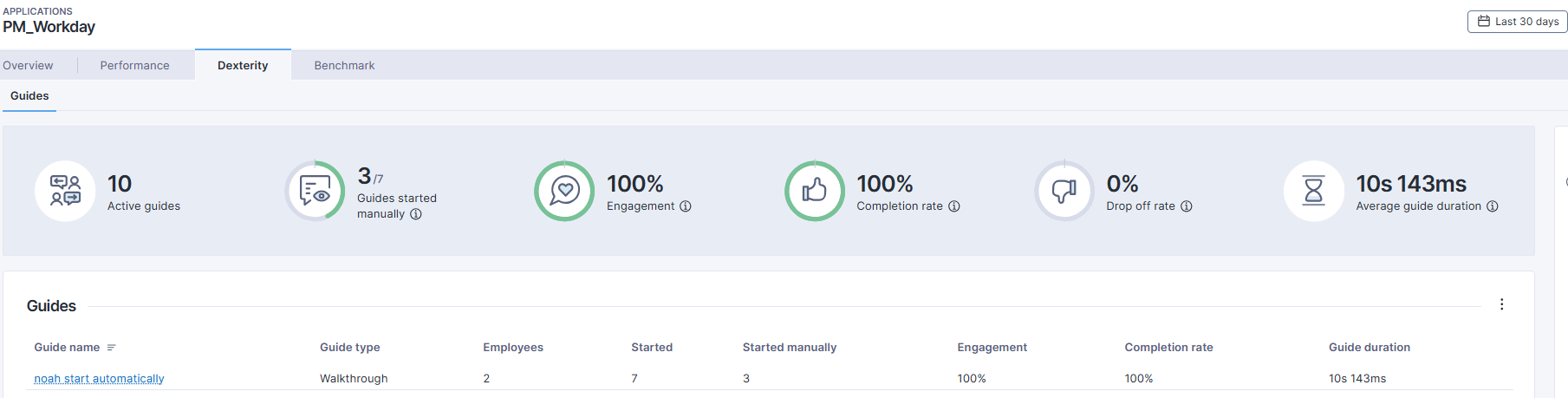
このパックには、[Application Dexterity](https://docs.nexthink.com/platform/ja/user-guide/applications/monitoring-applications/monitoring-web-applications/guides) Experienceを反映するように設計され、より詳細な分析が可能なライブダッシュボードが含まれています。静的なダッシュボードとは異なり、リアルタイムのデータへのドリルダウンをサポートし、より深い使用分析と調査能力を提供します。
## ライブラリパックは使用している
{% hint style="info" %}
このページの[使用ケース](#use-cases)にジャンプして、関連するシナリオアプリケーションを確認してください。
{% endhint %}
ライブラリパックのコンテンツは次の目的で使用します:
### **可視性**
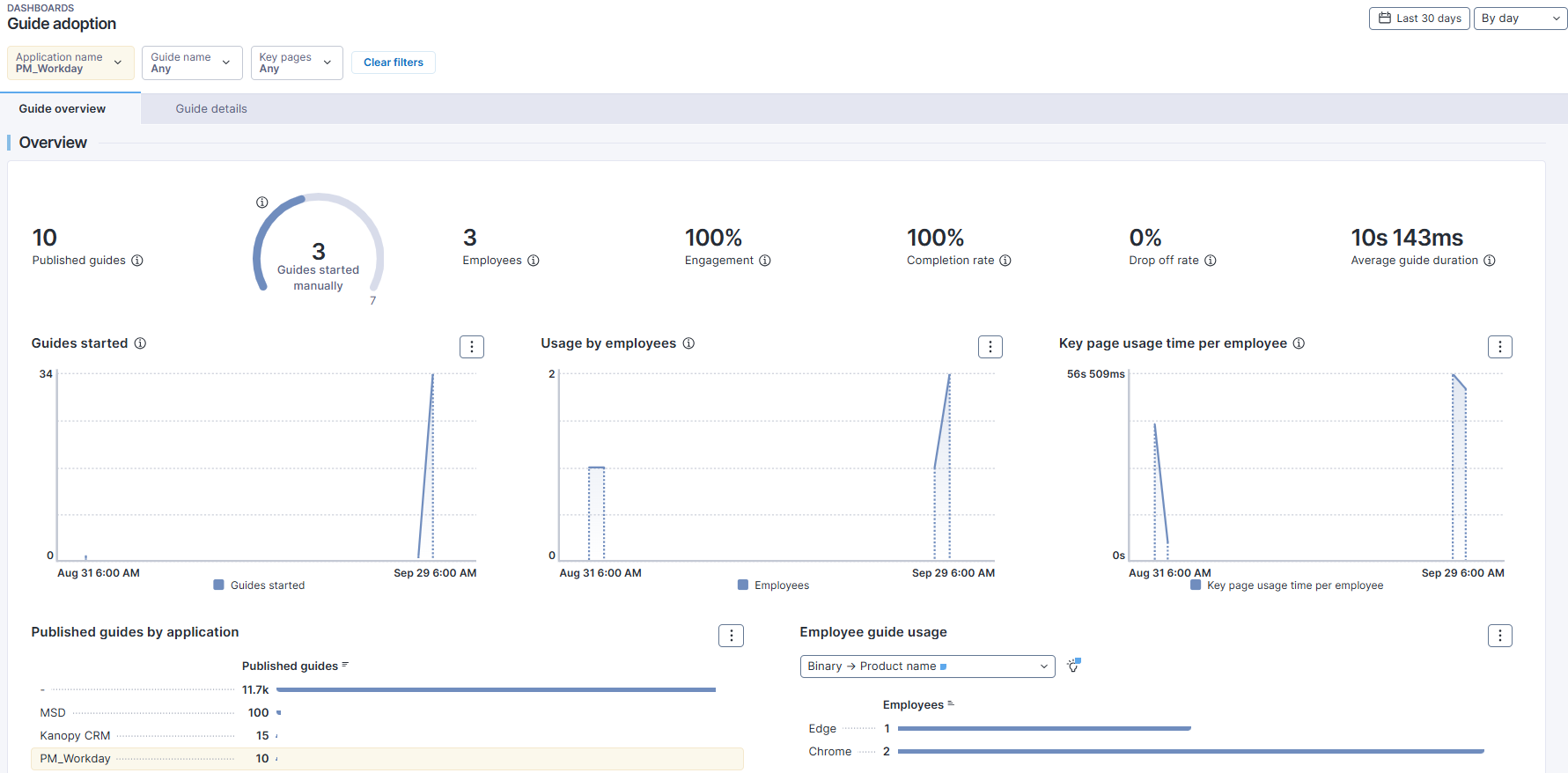
**ガイド導入** [ライブダッシュボード](https://docs.nexthink.com/platform/ja/user-guide/live-dashboards) は、このパックのコア要素です。それは **Application Dexterity** ダッシュボードを模倣し、拡張されたインサイトを提供します。お馴染みの KPI と、ページレベルおよびステップレベルのガイドエンゲージメントに焦点を当てたダッシュボードは、基本的な導入メトリクスを実行可能なインサイトに変えます。次のことができます:
* ライブ使用データを詳細に調査する
* ガイドタイプ全体のトレンドを識別する
* ダッシュボードから直接調査を開始する
#### ダッシュボードをナビゲートする
選択したアプリケーションのために提供されているデキスタリティタブは、ガイドの使用状況と採用状況の概略を簡単に把握するのに最適です。
ただし、詳細な分析を行う場合、例えば実際にガイドを使用している従業員やガイドの使用がどのように時間とともに変化しているかを判断するのは、より複雑になることがあります。
提供された [ライブダッシュボード](https://docs.nexthink.com/platform/ja/user-guide/live-dashboards) **用ガイド導入** は、これらの重要なKPIを複製し、追加のインサイトを提供することを目的としています。
* 時間経過と共に開始されたガイド
* 時間経過と共に変化する従業員の使用状況
* アプリケーション別に公開されたガイド
* 複数の内訳による従業員のガイド使用率。
## ユースケース
以下に示す関連するユースケースに加えて、環境に特有の他のトラブルシューティングシナリオを発見することができるかもしれません。
### ガイドに最も多くの時間を費やしている従業員の特定
長時間続くガイドは、複数のステップを含む複雑なプロセスをサポートすることが多いです。これらのガイドに最も時間を費やしている従業員を特定することで以下が可能になります:
* ユーザーの課題を理解する
* 明確さと流れを改善する
* フィードバックを得るための **Engage** キャンペーンを対象にする
**ガイド概要** タブから:
1. 「ウォークスルー」内訳までスクロールダウン
2. デフォルトでは、棒グラフは従業員別に並べ替えられています。最も長く続いているガイドで並べ替えするには、「ガイドの継続時間」ヘッダーをクリックします。
3. 特定のガイドに最も関与している従業員を判別するために、リストされた従業員を**絞り込み**ます。
### ガイド内の問題があるステップの特定
長いステップ継続時間や低いステップ完了率は、摩擦や混乱を示すことがあります。
ガイド導入ライブダッシュボードでステップレベルの動作を分析するには:
1. ウォークスルーの内訳からガイドを選択するか、ダッシュボードフィルタを使用してください。
2. ガイド詳細タブに切り替えてステップ表にアクセスする。
3. 異常に長い時間や低い完了率を持つステップを特定。これは、ガイド内で複雑な手順またはエラーがあることを示すかもしれません。
4. オプションで、そのステップに関与しているユーザーに連絡して、さらなる調査やフィードバックを得る。
5. この分析は、ガイドの有効性を向上させ、従業員の体験をスムーズにするのに役立ちます。
## 関連トピック
* [ライブダッシュボードを管理する](https://nexthink.gitbook.io/opd/ja/user-guide/live-dashboards/managing-live-dashboards)
* [リモートアクションを管理する](https://nexthink.gitbook.io/opd/ja/user-guide/remote-actions/managing-remote-actions)
* [キャンペーンを管理する](https://nexthink.gitbook.io/opd/ja/user-guide/campaigns/managing-campaigns)
* [ワークフローを管理する](https://nexthink.gitbook.io/opd/ja/user-guide/workflows/managing-workflows)
* [カスタムフィールドを管理する](https://nexthink.gitbook.io/opd/ja/user-guide/administration/content-management/custom-fields-management)
* [評価を管理する](https://nexthink.gitbook.io/opd/ja/user-guide/administration/content-management/ratings-management)
* [カスタムトレンドを管理する](https://nexthink.gitbook.io/opd/ja/user-guide/administration/content-management/custom-trends-management)
* [アプリケーションを管理する](https://nexthink.gitbook.io/opd/ja/user-guide/applications/managing-applications)
* [ソフトウェアメーターリングルールを管理する](https://nexthink.gitbook.io/opd/ja/user-guide/software-metering/managing-software-metering)
* [ガイド導入](/platform/ja/library-packs/applications/adopt-library-packs/guide-adoption.md)
* [設定ガイド: ガイド採用](broken://spaces/ZeA7tTt086G6thc9T1wB/pages/BeedtGgpIv9DmB1oWgW6)
---
# Agent Instructions
This documentation is published with GitBook. GitBook is the documentation platform designed so that both humans and AI agents can read, navigate, and reason over technical content effectively. Learn more at gitbook.com.
## Querying This Documentation
If you need additional information that is not directly available in this page, you can query the documentation by asking a question.
Perform an HTTP GET request on the following URL with the `ask` and `goal` query parameters:
```
GET https://docs.nexthink.com/platform/ja/library-packs/applications/adopt-library-packs/guide-adoption/usage-guide-guide-adoption.md?ask=&goal=
```
`ask` is the immediate question: it should be specific, self-contained, and written in natural language.
`goal` is what the user is ultimately trying to achieve, the reason they need the answer. Sharing it helps GitBook give you a better, more relevant answer. A goal is most helpful when it describes the outcome the user wants rather than restating the question. For example, with `ask=how do I create an API token`, a goal like `automate deployments from our CI pipeline` lets GitBook tailor the answer to that use case.
The response will contain a direct answer to the question and relevant excerpts and sources from the documentation.
Use this mechanism when the answer is not explicitly present in the current page, you need clarification or additional context, or you want to retrieve related documentation sections.