> For the complete documentation index, see [llms.txt](https://docs.nexthink.com/llms.txt). Markdown versions of documentation pages are available by appending `.md` to page URLs; this page is available as [Markdown](https://docs.nexthink.com/platform/ja/library-packs/applications/adopt-library-packs/ai-compliance/usage-guide-ai-compliance.md).
# 利用ガイド:AI コンプライアンス
{% hint style="warning" %}
このページでは、パックを使用するための様々な方法とユースケース例を示します。
管理者は、インストールされたコンテンツを設定およびカスタマイズするために、[Configuration guide: AI compliance](/platform/ja/library-packs/applications/adopt-library-packs/ai-compliance/configuration-guide-ai-compliance.md) を参照できます。
{% endhint %}
**AIコンプライアンス** ライブラリパックは、EUCチームが以下を可能にします:
* すべての役割において、安全でコンプライアンス対応のAI採用を促進します。
* 企業のデータ取扱およびガバナンスポリシーを強化します。
* 従業員のAIの責任ある使用に対する認識と信頼を構築します。
さらに、このライブラリパックは、これらのガイドのインストールを容易にする事前設定済みのアプリケーションを提供します。
## ライブラリパックは使用している
{% hint style="info" %}
このページの[使用ケース](#use-cases)にジャンプして、関連するシナリオアプリケーションを確認してください。
{% endhint %}
以下の目的のためにライブラリパックのコンテンツを使用します。
### **可視性**
**AIコンプライアンス** [採用ガイド](https://docs.nexthink.com/platform/ja/overview/products#products-adopt)は、このライブラリパックの出発点です。
#### ChatGPT
**承認されていないAIツールの警告** - MS CoPilotが業務タスクのために承認されているAIツールであることをユーザーにリマインドし、安全な使用法と制限を説明した後に進むための警告を表示します。
#### MS Copilot
**ガイド付きウォークスルー** - 初心者ユーザーにMicrosoft CoPilotの主要な機能、例えば、プロンプト、新規チャット、およびプロンプトギャラリーを紹介し、ツールを効果的に理解し使用するのを手助けします。
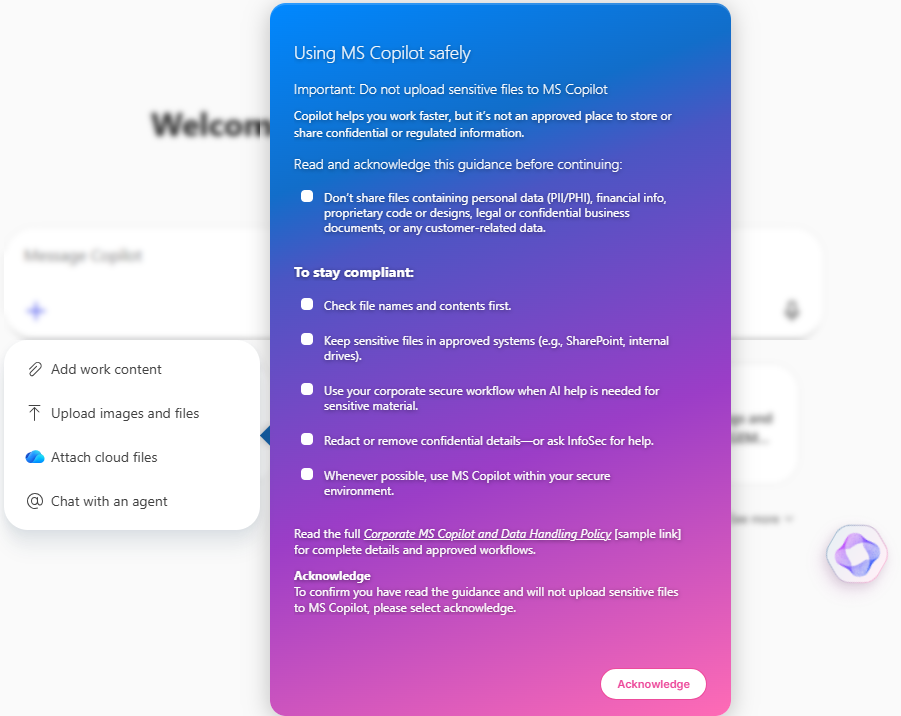
**ファイルアップロードポリシー通知** - ユーザーが感度の高い情報をアップロードしないようにリマインドし、コンプライアンスを守るために継続前に記録される承認を要求します。
## 使用ケース
以下に示す関連するユースケースに加えて、環境に特有の他のトラブルシューティングシナリオを発見することができるかもしれません。
### MS Copilotをビジネスタスクにおける承認済みかつ推奨されるAIツールとして強化します。
**非承認AIツール警告**ガイドは、ユーザーがビジネス目的でChatGPTにアクセスするときに明確な警告を表示します。 Microsoft Copilotがすべての作業関連の使用のために承認され推奨されるAIツールであることをユーザーに知らせ、適切なAI使用ケースを示し、機密内容の使用制限を明確にします。ユーザーは理解を確認するか、そのガイドから直接Copilotを開くことを選択する必要があります。
### MS Copilotの初回ユーザーへの案内
**ガイド付きウォークスルー**ガイドは、Microsoft Copilotの主要な要素を紹介する短いガイド付きウォークスルーを提供します。ユーザーが新しいチャットを開始し、効果的なプロンプトを作成し、プロンプトギャラリーを探索する方法について慣れ親しませ、迅速に自信を持ってCopilotの機能を最大限に活用できるようにします。
### MS Copilotへの機密または機密ファイルのアップロードをユーザーに警告します
**ファイルアップロードポリシー通知**ガイドは、ユーザーがファイルをアップロードしようとしたときに表示される必須の承認ステップを導入します。ユーザーに感度の高い情報を識別する方法を教育し、継続する前に理解を確認します。一度認識されると、ガイドの完了状況をコンプライアンス目的で追跡できるようになります。
***
関連トピック
* [ワークフロー管理](https://nexthink.gitbook.io/opd/user-guide/workflows/managing-workflows)
* [アプリケーション管理](https://nexthink.gitbook.io/opd/user-guide/applications/managing-applications)
* [AIコンプライアンス](/platform/ja/library-packs/applications/adopt-library-packs/ai-compliance.md)
* [設定ガイド:AIコンプライアンス](broken://spaces/ZeA7tTt086G6thc9T1wB/pages/BeedtGgpIv9DmB1oWgW6)
---
# Agent Instructions
This documentation is published with GitBook. GitBook is the documentation platform designed so that both humans and AI agents can read, navigate, and reason over technical content effectively. Learn more at gitbook.com.
## Querying This Documentation
If you need additional information that is not directly available in this page, you can query the documentation by asking a question.
Perform an HTTP GET request on the following URL with the `ask` and `goal` query parameters:
```
GET https://docs.nexthink.com/platform/ja/library-packs/applications/adopt-library-packs/ai-compliance/usage-guide-ai-compliance.md?ask=&goal=
```
`ask` is the immediate question: it should be specific, self-contained, and written in natural language.
`goal` is what the user is ultimately trying to achieve, the reason they need the answer. Sharing it helps GitBook give you a better, more relevant answer. A goal is most helpful when it describes the outcome the user wants rather than restating the question. For example, with `ask=how do I create an API token`, a goal like `automate deployments from our CI pipeline` lets GitBook tailor the answer to that use case.
The response will contain a direct answer to the question and relevant excerpts and sources from the documentation.
Use this mechanism when the answer is not explicitly present in the current page, you need clarification or additional context, or you want to retrieve related documentation sections.
.png?alt=media)