> For the complete documentation index, see [llms.txt](https://docs.nexthink.com/llms.txt). Markdown versions of documentation pages are available by appending `.md` to page URLs; this page is available as [Markdown](https://docs.nexthink.com/platform/ja/configuring_nexthink/configuring-your-platform/configuring-your-platform-classic/configuring-session-performance-storage-classic.md).
# セッションパフォーマンスストレージの構成(クラシック)
{% hint style="info" %}
このページは、Finder、Portal、Engineコンポーネントを含むクラシックバージョンのNexthinkを使用しているユーザーのみに適用されます。
{% endhint %}
セッションパフォーマンスデータは、webインターフェイスを使用して有効にした場合のみ保存されます。デフォルトでは無効になっています。有効化された場合、必要な設定は接続されたEnginesに自動的に構成されます。変更を単一のEngineまたはその一部に制限することはできません。パラメータの変更は、接続されたシステムの再起動を引き起こしません。
## セッションパフォーマンスストレージ管理
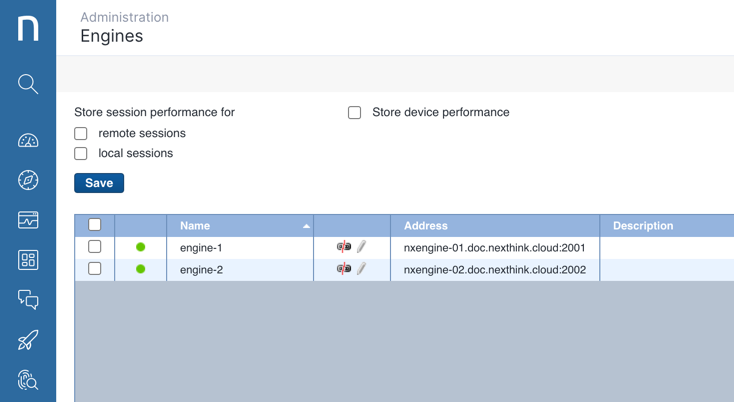
ストレージポリシーを構成するには、管理者としてwebインターフェイスに接続します。左側のメインナビゲーションバーで管理アイコンをクリックし、**システム構成**セクションの下で**Engines**を選択します。
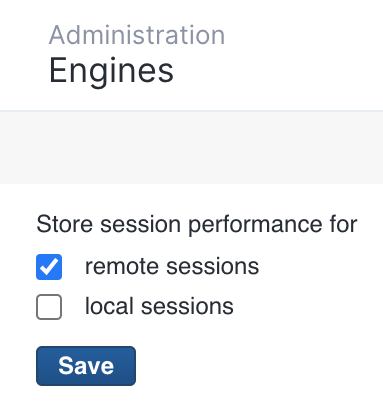
サーバーへの接続に関する追加情報を保存したい場合は、**リモートセッション**の横のボックスにチェックを入れます。
コンソールセッションを使用するリモートセッションに関する追加情報を保存したい場合は、**ローカルセッション**の横のボックスにチェックを入れます。
## データ保持への影響
この補足データをEngineで保存するオプションを有効にすると、それが保存するイベントの数に影響を及ぼし、結果としてデータ保持全体に影響します。通常、5%未満の影響が見込まれます。例えば、2000万のイベントを保存するように設定されたEngineは、セッションパフォーマンスモニタリングに関連するイベントが100万件まで含まれる可能性があります。
***
関連トピック
* [Engine (クラシック)](/platform/ja/references/references-classic/glossary-classic/engine-classic.md)
* [セッションパフォーマンス (クラシック)](/platform/ja/references/references-classic/database-information-and-organization-classic/session-performance-classic.md)
---
# Agent Instructions
This documentation is published with GitBook. GitBook is the documentation platform designed so that both humans and AI agents can read, navigate, and reason over technical content effectively. Learn more at gitbook.com.
## Querying This Documentation
If you need additional information that is not directly available in this page, you can query the documentation by asking a question.
Perform an HTTP GET request on the following URL with the `ask` and `goal` query parameters:
```
GET https://docs.nexthink.com/platform/ja/configuring_nexthink/configuring-your-platform/configuring-your-platform-classic/configuring-session-performance-storage-classic.md?ask=&goal=
```
`ask` is the immediate question: it should be specific, self-contained, and written in natural language.
`goal` is what the user is ultimately trying to achieve, the reason they need the answer. Sharing it helps GitBook give you a better, more relevant answer. A goal is most helpful when it describes the outcome the user wants rather than restating the question. For example, with `ask=how do I create an API token`, a goal like `automate deployments from our CI pipeline` lets GitBook tailor the answer to that use case.
The response will contain a direct answer to the question and relevant excerpts and sources from the documentation.
Use this mechanism when the answer is not explicitly present in the current page, you need clarification or additional context, or you want to retrieve related documentation sections.