> For the complete documentation index, see [llms.txt](https://docs.nexthink.com/llms.txt). Markdown versions of documentation pages are available by appending `.md` to page URLs; this page is available as [Markdown](https://docs.nexthink.com/platform/ja/configuring_nexthink/bringing-data-into-your-nexthink-instance/integrating-nexthink-with-third-party-tools/api-and-integrations-classic/data-enricher-classic.md).
# データエンリチャー (クラシック)
## 概要
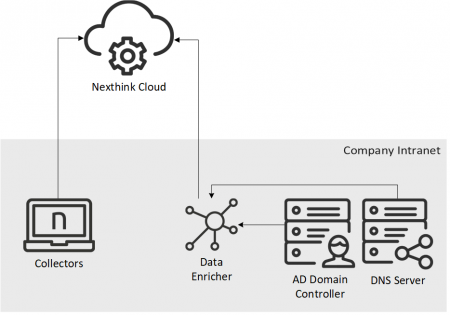
データ強化装置は、Nexthink Cloudにコレクターが送信する[ユーザー](/platform/ja/references/references-classic/glossary-classic/user-classic.md)および[宛先](/platform/ja/references/references-classic/glossary-classic/destination-classic.md)に関する情報を補完するソフトウェアコンポーネントです。
Active DirectoryとDNSサーバーに接続されたWindowsサーバーに[データ強化装置をインストール](/platform/ja/configuring_nexthink/bringing-data-into-your-nexthink-instance/integrating-nexthink-with-third-party-tools/api-and-integrations-classic/data-enricher-classic/installing-data-enricher-classic.md)します。
## 取得した情報
データ強化装置は、あなたのサーバーから以下の情報を取得します:
* Active Directoryからのユーザー情報:
* 識別名
* 名前
* フルネーム
* 部署
* 職位
* 位置
* 地域名
* 国コード
* 組織単位名
* 逆DNSルックアップからの宛先情報:
* 完全修飾ドメイン名
これらのデータは、オンプレミス設定でEngineが取得するデータと類似しています。ユーザーフィールドの地域、地域名、国コード、組織単位名は、Nexthink Experience専用で利用可能です。
## 推定処理時間
使用可能なネットワーク帯域幅が25 Mbpsの場合、Azure VM(Standard\_F4s - 4 CPUコア、8 GBメモリ)で動作するWindows Server 2016上でデータ強化装置を実行した場合の部分更新の以下の時間が計測されました。
ADからユーザー情報を取得するのにかかる時間:
| ユーザー数 | 期間 |
| ----- | ---------- |
| 500 k | < 7 分 |
| 250 k | < 3 分 30 秒 |
| 100 k | < 1 分 30 秒 |
| 50 k | < 40 秒 |
| 20 k | < 20 秒 |
| 10 k | < 10 秒 |
| 1 | < 5 秒 |
DNSサーバーから宛先のFQDNを取得するのにかかる時間:
| 宛先数 | 期間 |
| ----- | ------ |
| 500 k | < 20 分 |
| 250 k | < 10 分 |
| 100 k | < 4 分 |
| 50 k | < 2 分 |
| 20 k | < 1 分 |
| 10 k | < 30 秒 |
| 1 | < 5 秒 |
---
# Agent Instructions
This documentation is published with GitBook. GitBook is the documentation platform designed so that both humans and AI agents can read, navigate, and reason over technical content effectively. Learn more at gitbook.com.
## Querying This Documentation
If you need additional information that is not directly available in this page, you can query the documentation by asking a question.
Perform an HTTP GET request on the following URL with the `ask` and `goal` query parameters:
```
GET https://docs.nexthink.com/platform/ja/configuring_nexthink/bringing-data-into-your-nexthink-instance/integrating-nexthink-with-third-party-tools/api-and-integrations-classic/data-enricher-classic.md?ask=&goal=
```
`ask` is the immediate question: it should be specific, self-contained, and written in natural language.
`goal` is what the user is ultimately trying to achieve, the reason they need the answer. Sharing it helps GitBook give you a better, more relevant answer. A goal is most helpful when it describes the outcome the user wants rather than restating the question. For example, with `ask=how do I create an API token`, a goal like `automate deployments from our CI pipeline` lets GitBook tailor the answer to that use case.
The response will contain a direct answer to the question and relevant excerpts and sources from the documentation.
Use this mechanism when the answer is not explicitly present in the current page, you need clarification or additional context, or you want to retrieve related documentation sections.