# HTTP WebリクエストのURLの報告（クラシック）

Webおよびクラウド製品を購入した場合、エンドユーザーが指定したドメイン名のグループに向けたHTTPウェブリクエストのURLを送信するように、Collectorを設定できます。 デフォルトでは、Collectorはネットワークトラフィックの生成量を低く抑え、エンジンを多数のURLであふれさせないために、各ウェブリクエスト内のドメイン名だけをエンジンに報告します（完全なURLは報告しません）。 しかし、限定されたウェブリクエストのURLだけを報告する場合でも、生成されるトラフィックは依然として合理的な低さを保ちます。特定のURLパスに基づいてサービスを定義したり、URLの条件を含む調査を行うといった追加情報を活用することが可能です。

この章では、エンドユーザーのデバイスからそれらのHTTPリクエストが向けられるドメイン名のリストを特定する方法を探ります。

## ドメインリストの受け入れられる構文 <a href="#reportingtheurlofhttpwebrequests-classic-acceptedsyntaxforthelistofdomains" id="reportingtheurlofhttpwebrequests-classic-acceptedsyntaxforthelistofdomains"></a>

Collectorの設定に選ばれた方法に関係なく、ドメイン指定の受け入れられる構文は同じです。 ドメイン名を記述するための許可された文字は、次を含むASCII文字セットのサブセットです。

* **a**から**z**および**A**から**Z**までの範囲の文字。
* **0**から**9**までの数字。
* シンボル\*\*.**（ドット）と**-\*\*（ハイフン）。
* シンボル\*\*:**（コロン）と**/\*\*（スラッシュ）。
* シンボル\*\*\*\*\*（アスタリスク）を使用し、ゼロまたは複数の文字を代替します。

次の表には、ドメイン名の例とCollectorによる解釈の方法が含まれています。

<table data-header-hidden data-full-width="true"><thead><tr><th></th><th></th></tr></thead><tbody><tr><td><code>www.example.com</code></td><td><code>www.example.com</code>に向けたすべてのHTTPリクエストと一致します。</td></tr><tr><td><code>[Workflows APIの概要](http://www.example.com)</code></td><td>上記と同様: <code>www.example.com</code>に向けたHTTPリクエストと一致します。</td></tr><tr><td><code>www.example.com</code></td><td><code>www.example.com</code>に向けたすべてのHTTPリクエストと一致します。</td></tr><tr><td><code>[Workflows APIの概要](http://example.com/index.html)</code></td><td><code>www.example.com</code>と同じように一致します（ホスト名の後のURLパスは無視されます）。</td></tr><tr><td><code>*.example.com</code></td><td>最初のドットの前に任意のプレフィックスがあるもの（例: <code>www.example.com</code>、<code>ftp.example.com</code>、<code>www.example.com</code>、ただし<code>another-example.com</code>は除く）と一致します。</td></tr><tr><td><code>*example.com</code></td><td>任意のプレフィックスとの一致（例: <code>www.example.com</code>、<code>ftp.example.com</code>、<code>www.example.com</code>、<code>another-example.com</code>）</td></tr><tr><td><code>***example.com</code></td><td>上記と同じ（連続する複数のアスタリスクは1つとしてカウントされます）。</td></tr><tr><td><code>ftp.example.com</code></td><td><code>ftp.example.com</code>に向けたすべてのHTTPリクエストと一致します（プロトコルはHTTPであり、FTPではありません）。</td></tr><tr><td><code>ftp://ftp.example.com</code></td><td><strong>エラー:</strong> 許可されているのはHTTPスキームのみです。</td></tr><tr><td><code>https://example.comを参照してください</code></td><td><strong>エラー:</strong> 許可されているのはHTTPスキームのみです。</td></tr><tr><td><code>-example.com</code></td><td><strong>エラー:</strong> ドメイン名はハイフンで始めたり終わったりすることはできません。</td></tr><tr><td>*</td><td><strong>エラー:</strong> "全てに一致"するアスタリスクパターンは単独では許可されていません。</td></tr></tbody></table>

## Collectorにおけるドメインリストの設定 <a href="#reportingtheurlofhttpwebrequests-classic-configuringthelistofdomainsinthecollector" id="reportingtheurlofhttpwebrequests-classic-configuringthelistofdomainsinthecollector"></a>

Collectorを展開する前または後に、CollectorがウェブリクエストのURLを報告するドメインリストを指定します。

* Collectorの展開前:
  * MSIにパラメーターを渡します。
  * Nexthink Collectorインストーラーを使用します。
* Collectorの展開後:
  * Nexthink Collector構成ツールを使用します。
  * レジストリキーの値を変更します。

Updaterを使用してCollectorを展開する場合、MSIの多くのパラメーター、および特にドメインリストは、インストール時に設定できず、更新間で保存されません。 Collectorの自動更新ごとに、展開後に設定を再適用する必要があります。

### MSIにパラメーターを渡す <a href="#reportingtheurlofhttpwebrequests-classic-passingparameterstothemsi" id="reportingtheurlofhttpwebrequests-classic-passingparameterstothemsi"></a>

CollectorをMSIファイルを使用してインストールする際に、パラメーター**DRV\_WEB\_AND\_CLOUD\_HOSTS**の値を設定して、ドメイン名のリストを指定します。 供給される値は、前のセクションで定義された構文によるカンマ区切りのドメインリストでなければなりません。

このオプションを利用するためには、Collectorがウェブ関連情報を収集するためにパラメーター**DRV\_WEB\_AND\_CLOUD\_DATA**を1（デフォルト値）に設定する必要があります。

### Nexthink Collectorインストーラーを使用する <a href="#reportingtheurlofhttpwebrequests-classic-usingthenexthinkcollectorinstaller" id="reportingtheurlofhttpwebrequests-classic-usingthenexthinkcollectorinstaller"></a>

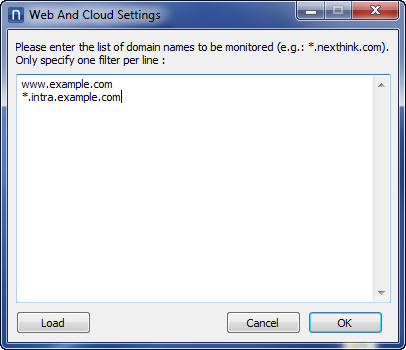
[CollectorをNexthink Collectorインストーラーで展開する](/platform/ja/configuring_nexthink/bringing-data-into-your-nexthink-instance/deploying-nexthink-in-non-vdi-environment/installing-collector/installing-collector-on-windows.md#installingcollectoronwindows-deploying-the-collector-using-the-nexthink-collector-installer)場合、「設定」ボタンをクリックした際に表示される「Webおよびクラウド設定」ダイアログボックスで、完全なURLを取得したいドメインリストを指定します。

<figure><img src="/files/DBpesBcsTRcR6cAIlSgK" alt=""><figcaption></figcaption></figure>

Collectorを更新している場合、新しい設定が以前に設定されたドメインリストを置き換えます。

### Nexthink Collector構成ツールを使用する <a href="#reportingtheurlofhttpwebrequests-classic-usingthenexthinkcollectorconfigurationtool" id="reportingtheurlofhttpwebrequests-classic-usingthenexthinkcollectorconfigurationtool"></a>

すでにCollectorを展開している場合、特定のデバイスからアクセスされた完全なURLを報告するドメインリストを変更するには、Nexthink Collector構成ツールを使用してください。 このツールは、デバイスに存在する必要があります。これはデフォルトでCollectorとともにインストールされますが、MSIオプションCFG\_INSTALLを0に設定しなければなりません。

管理者権限でツールを実行し、ドメインリストをコマンドラインのパラメーターとして、カンマで区切って指定してください。

`C:\Windows\System32\nxtcfg.exe /s wm_domains="csv_list_of_domains"`

### レジストリキーの値を設定する <a href="#reportingtheurlofhttpwebrequests-classic-settingthevalueofaregistrykey" id="reportingtheurlofhttpwebrequests-classic-settingthevalueofaregistrykey"></a>

完全なURLを報告するためのドメインリストは、次の場所のレジストリに保存されます：`HKEY_LOCAL_MACHINE\SYSTEM\CurrentControlSet\services\nxtrdrv\params\hosts`

この変数の値を変更すると、Collectorはその変更を検出し、変更を適用します。 ドメインの構文にエラーが検出された場合、そのエラーはログに記録されますが、サービスはリスト内の次のドメインに進むだけです。 高負荷下では、Collectorが環境変数の変更を見逃す可能性があります。変更を強制するために再起動が必要です。 このため、この方法はプレプロダクション環境でのテストにのみ推奨されます。

デバッグ目的で、この場合にのみ"全てに一致"するアスタリスクパターン\*\*\*\*\*を使用することが許可されます。 これはルールの唯一の例外であり、特定のデバイスでの接続性問題を検出するのに役立つ可能性があります。

## 技術的およびセキュリティの制限 <a href="#reportingtheurlofhttpwebrequests-classic-technicalandsecuritylimits" id="reportingtheurlofhttpwebrequests-classic-technicalandsecuritylimits"></a>

記載されているどの方法を使用しても、最大20ドメインまで指定できます。 Collectorは、URLの長さを最大1024文字までに制限します。 1024文字を超えるURLを処理する稀なケースでは、Collectorはそれを最初の1024文字に切り詰めます。

この機能は、HTTPリクエストでのみ使用でき、HTTPSリクエストでは使用できないことに注意してください。 TLS暗号化のため、HTTPSリクエストのURLを取得することはできません。 さらに、HTTPSリクエストの正確なURLを報告することで、セキュリティやプライバシーの侵害が発生する可能性があります。

同様に、CollectorはURLのクエリ文字列部分（すなわち、ウェブアプリケーションが使用するオプションのパラメーターリストを、URLの末尾に追加するもの）は決して報告しません。 クエリ文字列には、ログイン名やパスワードなどの機密情報が含まれることが多いです。

***

関連タスク

* [サービスの作成](/platform/ja/user-guide/using-finder-classic/monitoring-it-services-classic/creating-a-service-with-finder-classic.md)
* [ウェブベースのサービスのURLパスを指定](/platform/ja/user-guide/using-finder-classic/monitoring-it-services-classic/specifying-url-paths-of-web-based-services-classic.md)
* [Collectorのインストール](/platform/ja/configuring_nexthink/bringing-data-into-your-nexthink-instance/deploying-nexthink-in-non-vdi-environment/installing-collector/installing-collector-on-windows.md)

関連する参考資料

* [Collector MSIパラメーター参照表](/platform/ja/configuring_nexthink/bringing-data-into-your-nexthink-instance/deploying-nexthink-in-non-vdi-environment/installing-collector/windows-collector-references/collector-msi-parameters-reference-table.md)
* [Nexthink Collector構成ツール](/platform/ja/configuring_nexthink/bringing-data-into-your-nexthink-instance/deploying-nexthink-in-non-vdi-environment/installing-collector/windows-collector-references/collector-configuration-tool-for-windows.md)


---

# Agent Instructions: Querying This Documentation

If you need additional information that is not directly available in this page, you can query the documentation dynamically by asking a question.

Perform an HTTP GET request on the current page URL with the `ask` query parameter:

```
GET https://docs.nexthink.com/platform/ja/configuring_nexthink/bringing-data-into-your-nexthink-instance/deploying-nexthink-in-non-vdi-environment/installing-collector/windows-collector-references/reporting-the-url-of-http-web-requests-classic.md?ask=<question>
```

The question should be specific, self-contained, and written in natural language.
The response will contain a direct answer to the question and relevant excerpts and sources from the documentation.

Use this mechanism when the answer is not explicitly present in the current page, you need clarification or additional context, or you want to retrieve related documentation sections.