> For the complete documentation index, see [llms.txt](https://docs.nexthink.com/llms.txt). Markdown versions of documentation pages are available by appending `.md` to page URLs; this page is available as [Markdown](https://docs.nexthink.com/platform/ja/configuring_nexthink/bringing-data-into-your-nexthink-instance/deploying-nexthink-in-non-vdi-environment/installing-collector/windows-collector-references/citrix-virtual-channel-allowlist-configuration.md).
# Citrix 仮想チャネル許可リストの設定
Citrix プラットフォームは、特定のDLLと実行可能ファイルを許可リストに登録して、適切な通信を可能にする必要があります。必要な仮想チャネル許可リスト設定は、使用しているCitrix Virtual Apps and Desktopsのバージョンに依存します。
以下のセクションでは、サポートされている各バージョンに対して明示的に許可する必要のあるコンポーネントを詳述しています。
## Citrix のバージョンを確認する
ご使用の環境に該当するセクションを確認するには、システムのインストール済みプログラム一覧で、インストールされている Citrix Virtual Apps and Desktops のバージョンを確認します。
\[IMAGE: Citrix Virtual Apps and Desktops のバージョン番号が表示されたインストール済みプログラム一覧]
## 2507以前のバージョン
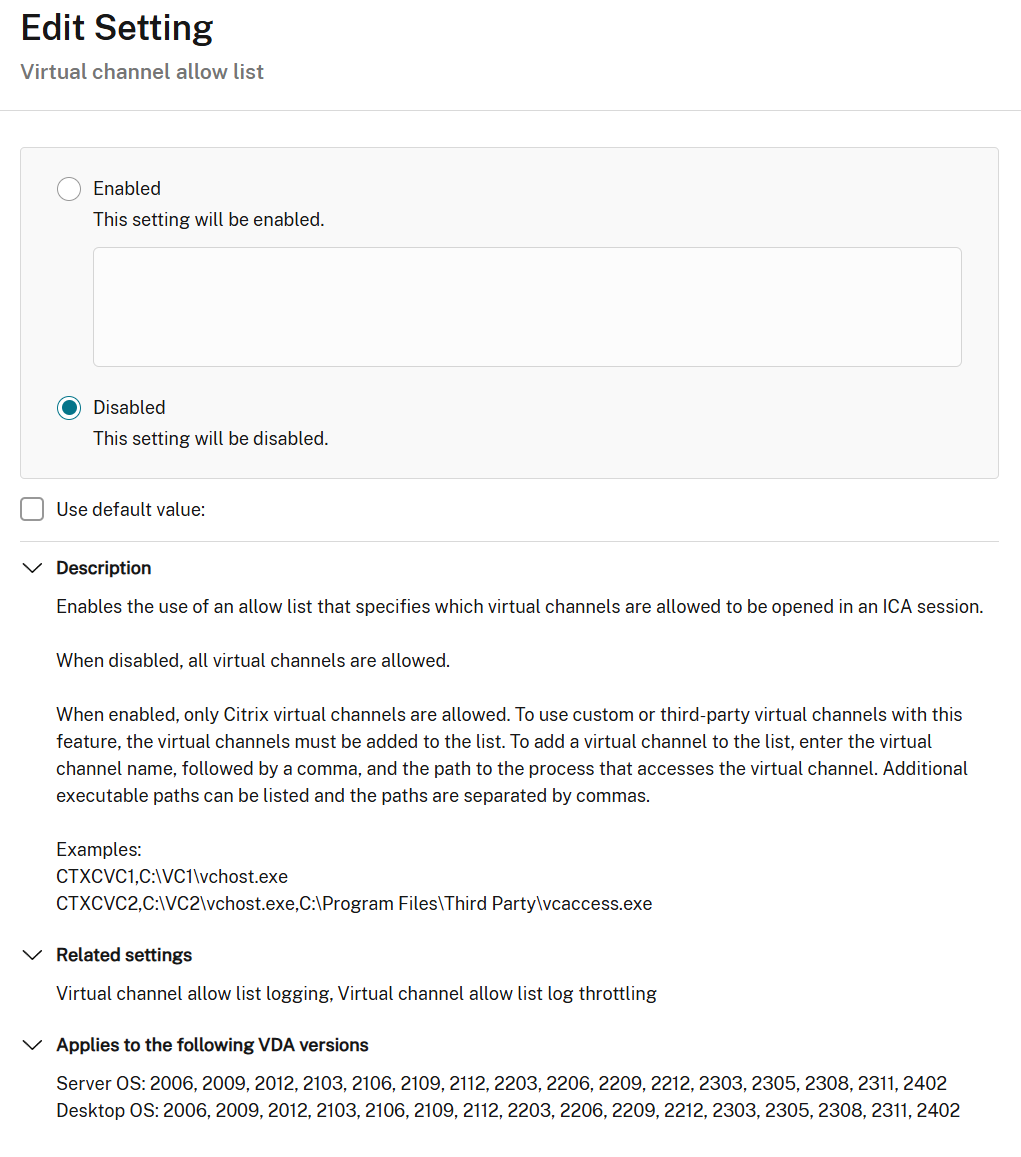
* **ポリシー名**: 仮想チャネル許可リスト
* **ステータス**: 無効
{% hint style="info" %}
ポリシーは作成され割り当てられる必要がありますが、その値は"無効"に設定します。ポリシーがアクティブでない場合、DVCは機能しません。
{% endhint %}
詳細な設定情報については、[Citrix ドキュメント](https://docs.citrix.com/ja-jp/citrix-virtual-apps-desktops/2402-ltsr/hdx-transport/virtual-channel-allow-list)を参照してください。
### 例
## バージョン 2507 LTSR CU1
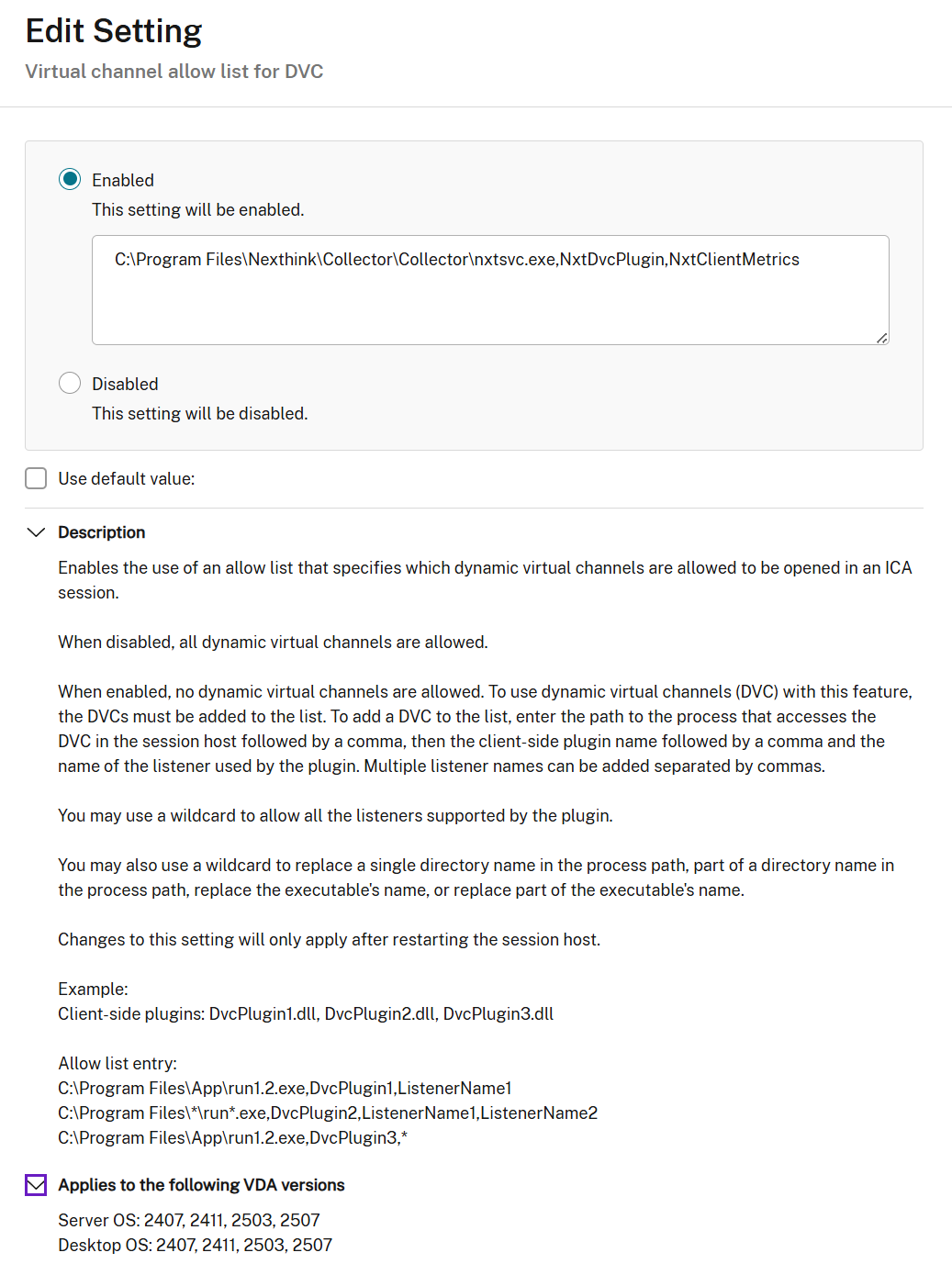
* **ポリシー名**: DVCのための仮想チャネル許可リスト
* **ステータス**: 有効
* **値**: `C:\Program Files\Nexthink\Collector\Collector\nxtsvc.exe,NxtDvcPlugin,NxtClientMetrics`
ポリシーが無効の場合、Citrix はすべての仮想チャネル接続を許可します。有効にすると、**値** に一覧表示されている接続のみが許可されます。
詳細な設定情報については、[Citrix ドキュメント](https://docs.citrix.com/ja-jp/citrix-virtual-apps-desktops/2507-ltsr/hdx-transport/virtual-channel-allow-list/virtual-channel-allow-list-for-dvc)を参照してください。
### 例
### ポリシーを検証する
ポリシーを適用した後、対応する Registry エントリを確認して、ポリシーが仮想マシンに適用されていることを確認します。 Registry 内のポリシー名には、「DVC」サフィックスは含まれません。
#### 例 — ポリシーが有効な場合
#### 例 — ポリシーが無効な場合
---
# Agent Instructions
This documentation is published with GitBook. GitBook is the documentation platform designed so that both humans and AI agents can read, navigate, and reason over technical content effectively. Learn more at gitbook.com.
## Querying This Documentation
If you need additional information that is not directly available in this page, you can query the documentation by asking a question.
Perform an HTTP GET request on the following URL with the `ask` and `goal` query parameters:
```
GET https://docs.nexthink.com/platform/ja/configuring_nexthink/bringing-data-into-your-nexthink-instance/deploying-nexthink-in-non-vdi-environment/installing-collector/windows-collector-references/citrix-virtual-channel-allowlist-configuration.md?ask=&goal=
```
`ask` is the immediate question: it should be specific, self-contained, and written in natural language.
`goal` is what the user is ultimately trying to achieve, the reason they need the answer. Sharing it helps GitBook give you a better, more relevant answer. A goal is most helpful when it describes the outcome the user wants rather than restating the question. For example, with `ask=how do I create an API token`, a goal like `automate deployments from our CI pipeline` lets GitBook tailor the answer to that use case.
The response will contain a direct answer to the question and relevant excerpts and sources from the documentation.
Use this mechanism when the answer is not explicitly present in the current page, you need clarification or additional context, or you want to retrieve related documentation sections.