> For the complete documentation index, see [llms.txt](https://docs.nexthink.com/platform/llms.txt). Markdown versions of documentation pages are available by appending `.md` to page URLs; this page is available as [Markdown](https://docs.nexthink.com/platform/ja/configuring_nexthink/bringing-data-into-your-nexthink-instance/connecting-mobile-devices-to-nexthink/deploying-nexthink-mobile-in-intune/nexthink-mobile-for-ios.md).
# iOS および iPadOS デバイスへのデプロイ
このガイドでは、Intune で iOS および iPadOS デバイス向けに Nexthink Mobile アプリをデプロイする方法を説明します。本ガイドは、デバイス管理および Nexthink オンボーディングを担当する IT 管理者を対象としており、iOS および iPadOS デバイス管理の概念と Intune の管理に精通していることを前提としています。
***
## 開始する前に
デプロイを開始する前に、次の要件を満たしていることを確認してください。
* 対象デバイスは監督対象であり、Intune に登録されています。
* 対象デバイスは Apple App Store にアクセスできます。
* [Nexthink Mobile の iOS および iPadOS 向けデバイス構成プロファイル](https://edocs.nexthink.com/nexthink-infinity/infinity-specifications/nexthink-mobile-app-configuration-profile-ios)のドキュメントの説明に従って、`Nexthink Mobile Device Configuration Profile.xml` ファイルをダウンロードして構成します。
* [インストールトークンの作成](/platform/ja/configuring_nexthink/bringing-data-into-your-nexthink-instance/connecting-mobile-devices-to-nexthink/creating-an-installation-token.md) のドキュメントに記載されているとおり、インストールトークンを作成します。
***
## Nexthink Mobile アプリの追加
デプロイの準備として、Nexthink Mobile を Intune に追加するために次の手順を実行します。
{% stepper %}
{% step %}
**アプリ > iOS/iPadOS > 作成** を選択します。
{% endstep %}
{% step %}
**アプリの種類** では、**iOS ストア アプリ** を選択します。
{% endstep %}
{% step %}
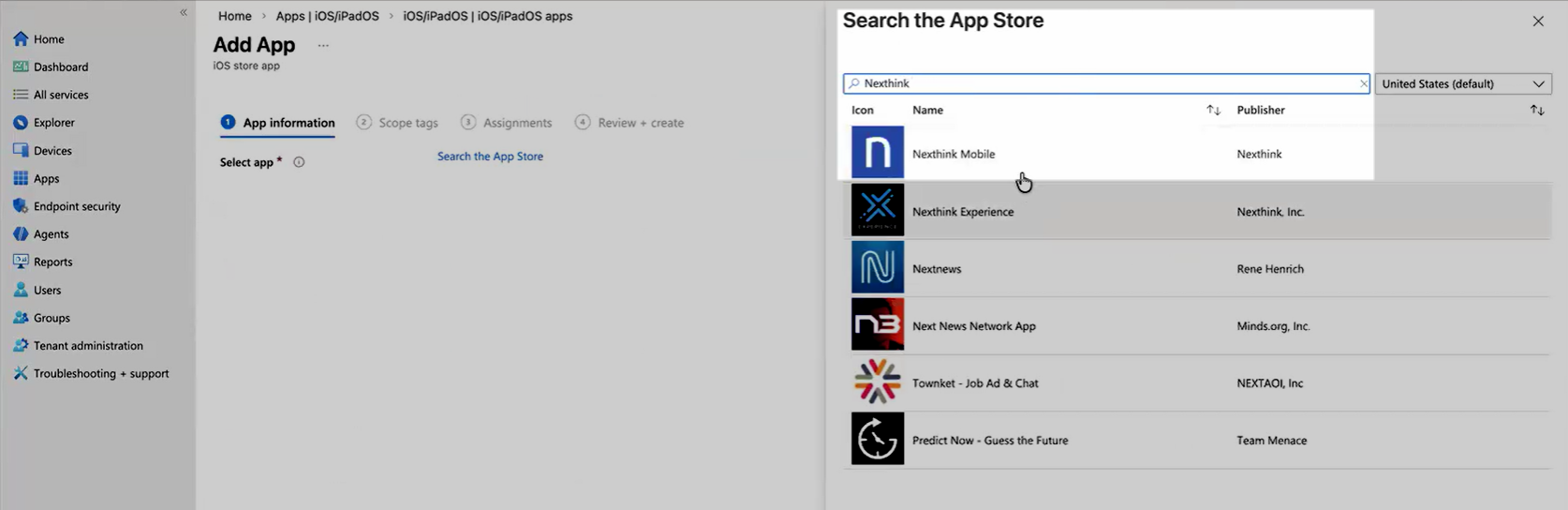
iOS Store で、**App Store を検索** に移動します。
{% endstep %}
{% step %}
キーワード「Nexthink Mobile」を検索し、検索結果からアプリをインストールします:
{% endstep %}
{% step %}
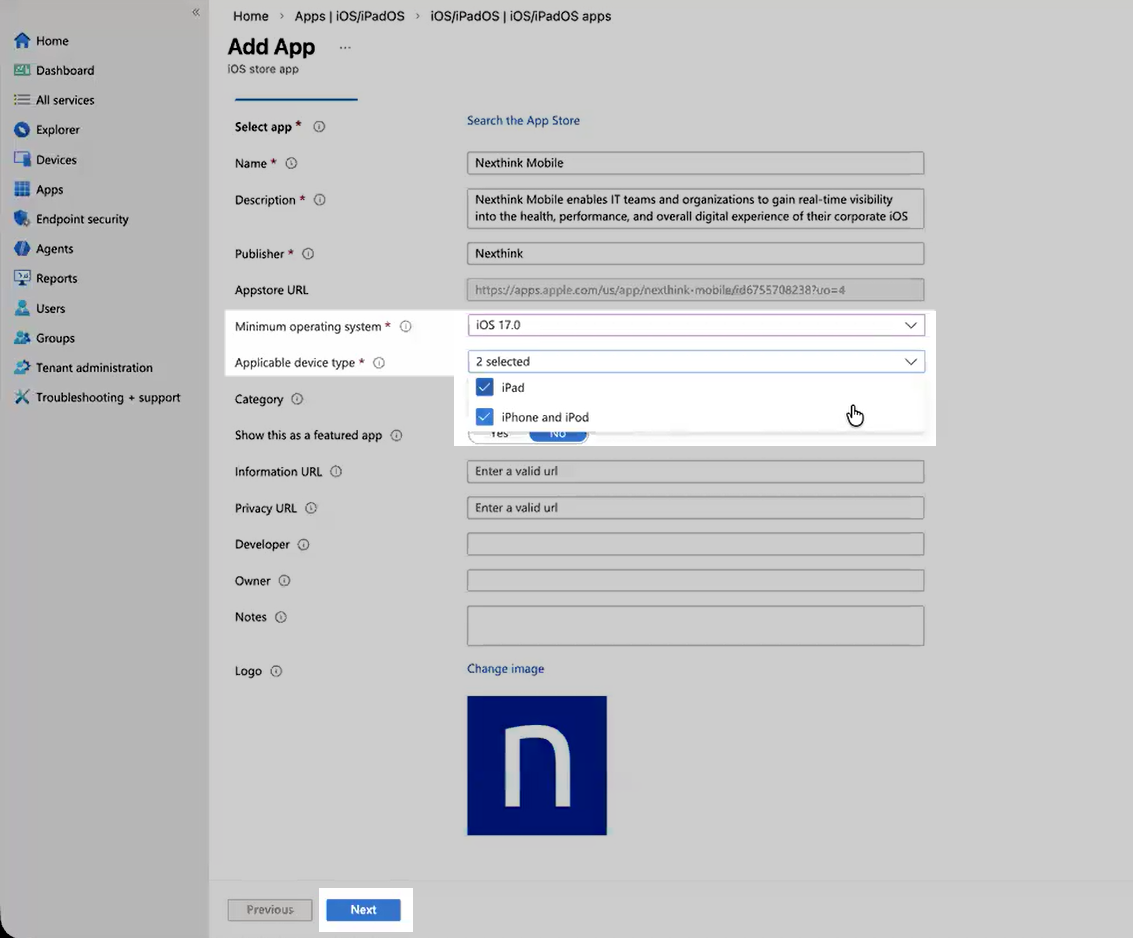
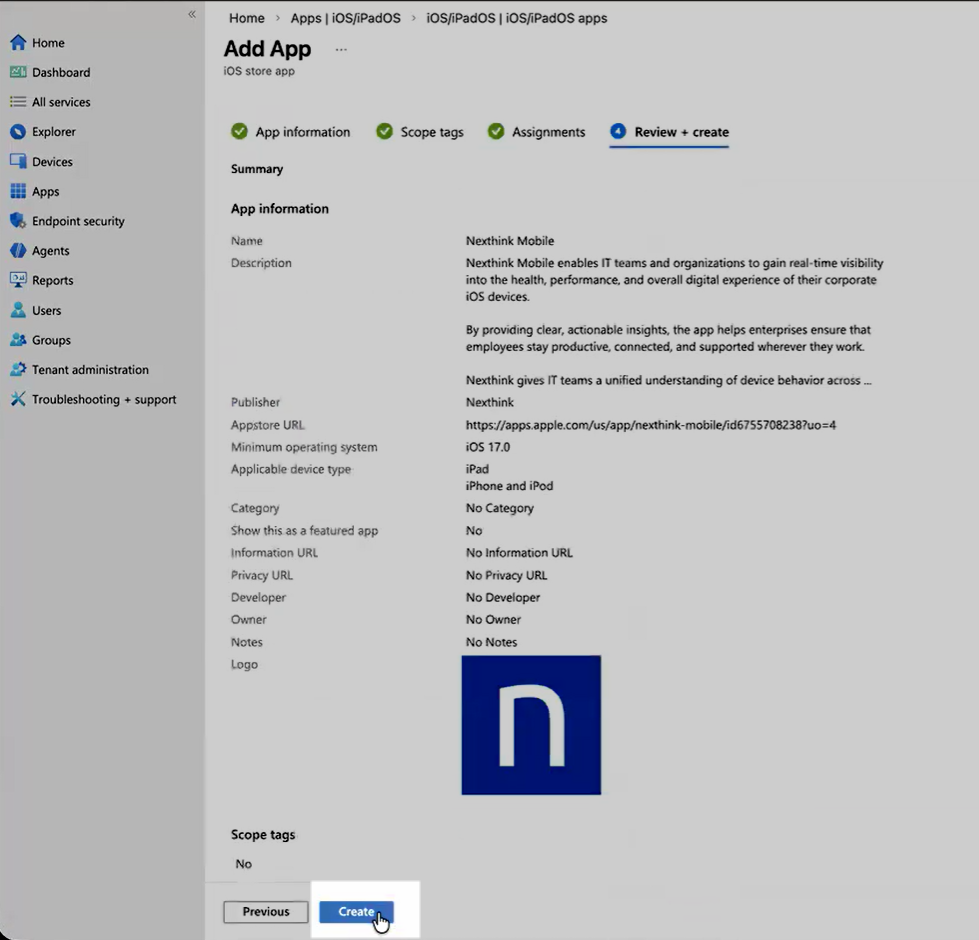
次の**アプリ情報**を構成します:
* **最小オペレーティング システム**を設定します: 17.0
* **適用可能なデバイスタイプ**を選択します:
* iPad
* iPhone および iPod
{% endstep %}
{% step %}
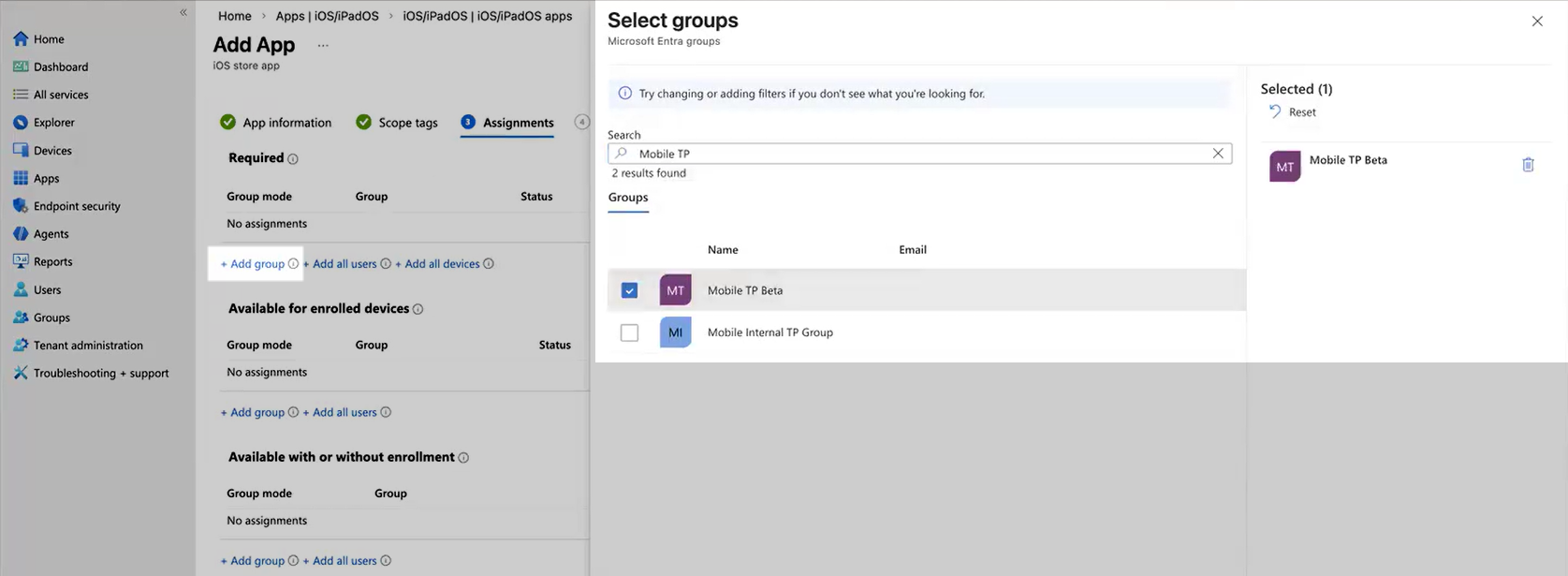
アプリケーションを該当するモバイルデバイスグループに割り当てます:
{% endstep %}
{% step %}
**次へ**を選択し、続いて**作成**を選択してアプリ作成を完了します:
{% endstep %}
{% endstepper %}
***
## カスタムデバイス構成プロファイルの作成
以下の手順に従って、カスタムデバイス構成プロファイルを作成し、Entra ID グループに割り当てます。
{% hint style="warning" %}
Intune では、デバイスごとにデバイス全体に適用されるコンテンツ フィルターを 1 つのみサポートしています。 Nexthink Mobile コンテンツ フィルターを展開する前に、他のコンテンツ フィルターがすでに展開されていないことを確認してください。
{% endhint %}
{% stepper %}
{% step %}
Intune で **デバイス > iOS/iPadOS > 構成** に移動します。
{% endstep %}
{% step %}
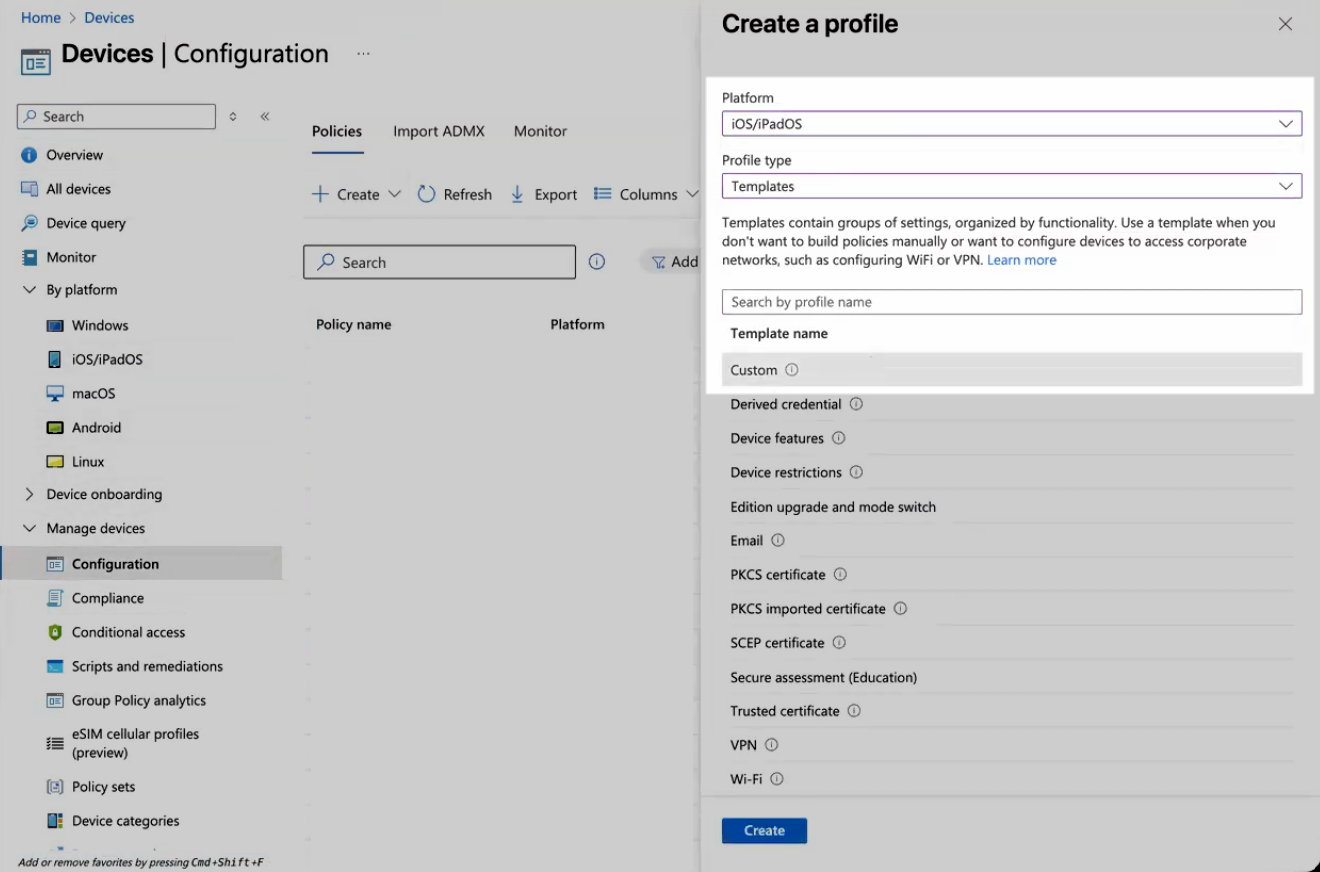
**作成 > 新しいポリシー** を選択し、次の値を設定します:
* **プラットフォーム**: iOS/iPadOS
* **プロファイルタイプ**: テンプレート
* **テンプレート名**: カスタム
**作成**をクリックします。
{% endstep %}
{% step %}
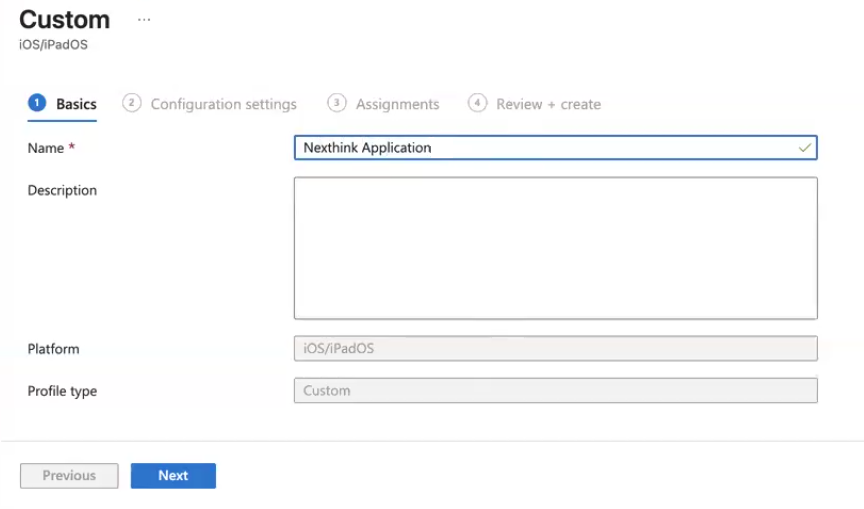
テンプレートにわかりやすい名前を付け、**次へ**を選択します:
{% endstep %}
{% step %}
プロファイルにわかりやすい名前を付け、[Nexthink Mobile app configuration profile (iOS)](https://edocs.nexthink.com/ja/nexthink-infinity/infinity-specifications/nexthink-mobile-app-configuration-profile-ios) から取得した構成 XML ファイルをアップロードします:
{% endstep %}
{% step %}
[Nexthink Mobile device configuration profile for iOS and iPadOS](https://edocs.nexthink.com/ja/nexthink-infinity/infinity-specifications/nexthink-mobile-app-configuration-profile-ios) のドキュメントに従い、構成ファイル内の値が正しいことを確認します。**次へ**を選択します。
{% endstep %}
{% step %}
ポリシーを該当するモバイルデバイスグループに割り当てます。完了したら、**次へ**を選択し、その後プロファイルを**作成**します:
{% endstep %}
{% endstepper %}
***
## オンボーディングとデータ収集の検証
{% stepper %}
{% step %}
#### デバイス上の構成を確認する
[Nexthink Mobile device configuration profile for iOS and iPadOS](https://edocs.nexthink.com/ja/nexthink-infinity/infinity-specifications/nexthink-mobile-app-configuration-profile-ios) のドキュメントに記載されているとおり、構成ファイルが正しく動作していることを確認します。
{% endstep %}
{% step %}
#### Nexthink におけるデバイスの可視性を確認する
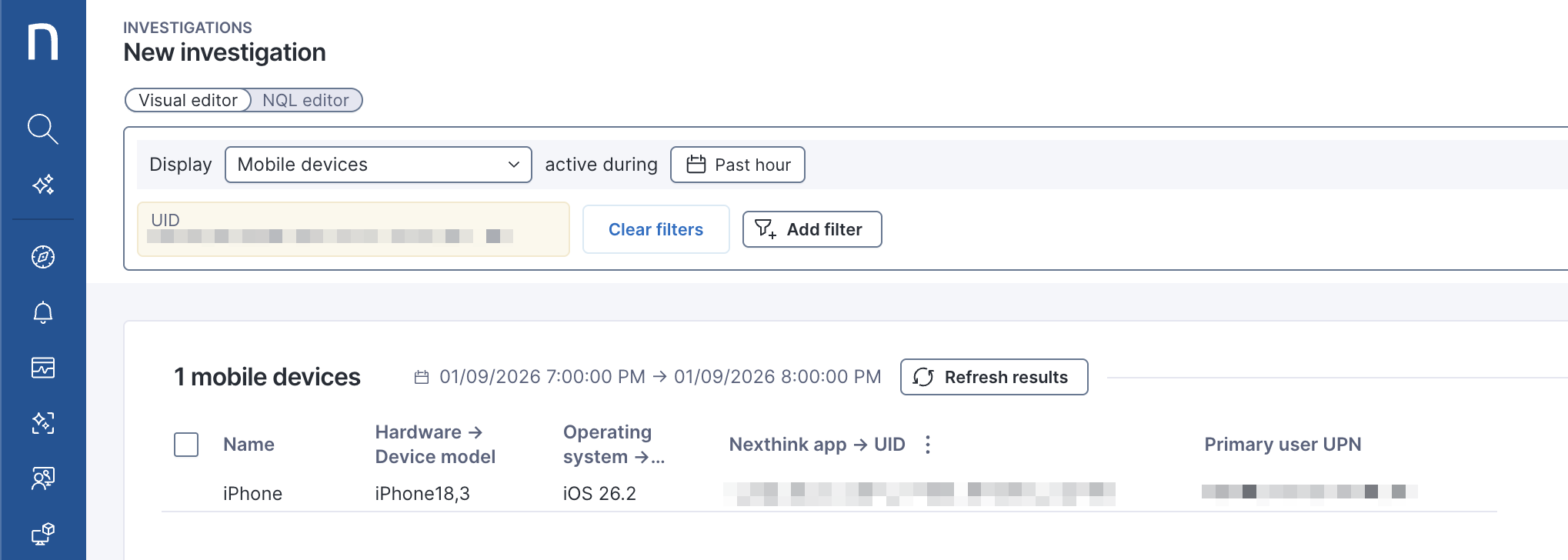
Nexthink で、次のインベスティゲーションを実行してデバイスがデータを送信していることを確認します:
{% code overflow="wrap" %}
```sql
mobile_devices during past 1h
| where mobile_device.uid in [""]
| list mobile_device.name, mobile_device.hardware.model, mobile_device.operating_system.name, mobile_device.uid, mobile_device.primary_user_upn
```
{% endcode %}
デバイスがクエリ結果に表示されれば、オンボーディングは成功しています:
{% endstep %}
{% endstepper %}
***
## クライアントデバイスでの Nexthink Mobile の構成 (オプション)
必要に応じて、クライアントデバイスでの Nexthink Mobile の構成方法については、[ユーザー デバイスでの Nexthink Mobile の構成](/platform/ja/configuring_nexthink/bringing-data-into-your-nexthink-instance/connecting-mobile-devices-to-nexthink/configuring-on-client-devices.md) ドキュメントを参照してください。
---
# Agent Instructions
This documentation is published with GitBook. GitBook is the documentation platform designed so that both humans and AI agents can read, navigate, and reason over technical content effectively. Learn more at gitbook.com.
## Querying This Documentation
If you need additional information that is not directly available in this page, you can query the documentation dynamically by asking a question.
Perform an HTTP GET request on the current page URL with the `ask` query parameter, and the optional `goal` query parameter:
```
GET https://docs.nexthink.com/platform/ja/configuring_nexthink/bringing-data-into-your-nexthink-instance/connecting-mobile-devices-to-nexthink/deploying-nexthink-mobile-in-intune/nexthink-mobile-for-ios.md?ask=&goal=
```
`ask` is the immediate question: it should be specific, self-contained, and written in natural language.
`goal` is optional and describes the broader end goal you are ultimately trying to accomplish on behalf of the user. GitBook uses it to tailor the answer towards what is most useful for that goal.
The response will contain a direct answer to the question and relevant excerpts and sources from the documentation.
Use this mechanism when the answer is not explicitly present in the current page, you need clarification or additional context, or you want to retrieve related documentation sections.
.png?alt=media)

.png?alt=media)