# Updating ServiceNow from Amplify

This page demonstrates how to auto-update ServiceNow ticket logs using [Webhooks](/platform/configuring_nexthink/bringing-data-into-your-nexthink-instance/integrating-nexthink-with-third-party-tools/outbound-connectors/webhooks.md), with remote actions or workflows executed from [Amplify](/platform/configuring_nexthink/bringing-data-into-your-nexthink-instance/deploying-nexthink-in-non-vdi-environment/configure-amplify.md).

Based on the configuration, the auto-update can happen when:

* A remote action or workflow is triggered.
* A remote action or workflow is completed.

{% hint style="info" %}
The code samples on this page can also apply to ServiceNow interactions by:

Replacing `external_source== "SNOW-Incident"` with `external_source== "SNOW-Interaction"` in the webhook **NQL condition**.

Replacing`/table/incident/` with `/table/interaction/` in the webhook **Resource** field.
{% endhint %}

## Configuring a connector credential for ServiceNow <a href="#updatingservicenowfromamplify-configuringwebhookstoupdateservicenowwhenaremoteactionistriggered" id="updatingservicenowfromamplify-configuringwebhookstoupdateservicenowwhenaremoteactionistriggered"></a>

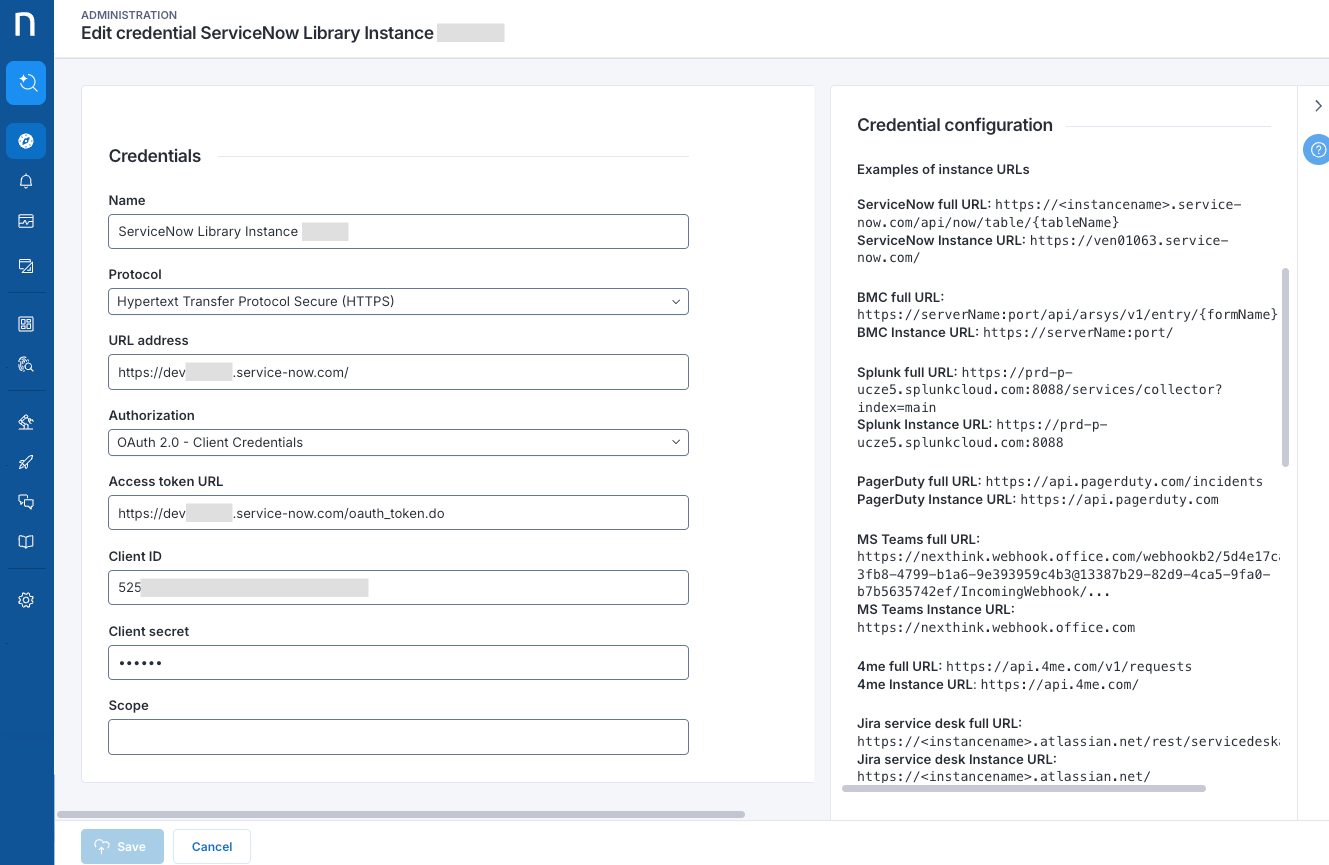
From the [connector credential](/platform/configuring_nexthink/bringing-data-into-your-nexthink-instance/integrating-nexthink-with-third-party-tools/outbound-connectors/connector-credentials.md) configuration page:

1. Choose the **HTTPS** option from the **Protocol** drop-down.
2. Paste the instance URL root `https://<instancename>.service-now.com/` into the **URL address** field.
   * Refer to the [connector credential](/platform/configuring_nexthink/bringing-data-into-your-nexthink-instance/integrating-nexthink-with-third-party-tools/outbound-connectors/connector-credentials.md#connectorcredentials-connectorcredentialsforhttpshttpsprotocol) documentation for more URL examples.

```
https://XXXXXXXXXX.service-now.com/
```

3. Choose the **OAuth 2.0 - Client Credentials** option from the **Authorization** drop-down
   * Fill in the **Access token URL**, **Client ID**, **Client secret** and **Scope** fields according to the [connector credential](/platform/configuring_nexthink/bringing-data-into-your-nexthink-instance/integrating-nexthink-with-third-party-tools/outbound-connectors/connector-credentials.md#connectorcredentials-supportedauthorizationmechanismsauthorizationtype) documentation.
4. **Save** the credential.

<figure><img src="/files/nQafrhk1Za7B9m4IAxKv" alt=""><figcaption></figcaption></figure>

## Configuring a webhook <a href="#updatingservicenowfromamplify-configuringwebhookstoupdateservicenowwhenaremoteactionistriggered" id="updatingservicenowfromamplify-configuringwebhookstoupdateservicenowwhenaremoteactionistriggered"></a>

The following sections detail two scenarios for updating ServiceNow. The procedure for each scenario is quite similar, involving identical steps but differing in the NQL condition and payload specific to the remote actions and workflows, and also depends on the given scenario.

### Update ServiceNow when a remote action or workflow is triggered <a href="#updatingservicenowfromamplify-configuringwebhookstoupdateservicenowwhenaremoteactionistriggered" id="updatingservicenowfromamplify-configuringwebhookstoupdateservicenowwhenaremoteactionistriggered"></a>

Configure a webhook in Nexthink that automatically updates incident ticket logs in ServiceNow when a remote action or workflow is triggered.

Remember to first set up a [connector credential](#updatingservicenowfromamplify-configuringwebhookstoupdateservicenowwhenaremoteactionistriggered) for the webhook.

1. From the [webhook configuration page](/platform/configuring_nexthink/bringing-data-into-your-nexthink-instance/integrating-nexthink-with-third-party-tools/outbound-connectors/webhooks/managing-webhooks.md), insert the **NQL condition** below. Refer to the [Configuring webhook NQL conditions](/platform/configuring_nexthink/bringing-data-into-your-nexthink-instance/integrating-nexthink-with-third-party-tools/outbound-connectors/webhooks/managing-webhooks/configuring-webhook-nql-conditions.md#configuringwebhooknqlconditions-validnqlconditionsexamplesforalert-relatedwebhooksnqlconditionexampl) documentation for more examples.
   * After filling in the NQL Condition, the system lists the [allowed placeholders](/platform/configuring_nexthink/bringing-data-into-your-nexthink-instance/integrating-nexthink-with-third-party-tools/outbound-connectors/webhooks/managing-webhooks/configuring-webhook-fields_-method-resource-and-payload.md#configuringwebhookfields-method-resource-andpayload-usingdatamodelvariablesasplaceholdersinthepayloa) for the **Payload**.

<table data-header-hidden><thead><tr><th width="185"></th><th></th></tr></thead><tbody><tr><td>NQL condition<br>for remote action</td><td><pre><code>remote_action.executions
| where internal_source == "Amplify" 
  And external_reference != "undefined" 
  And external_source == "SNOW-Incident" 
  And status == in_progress 
  and remote_action.nql_id != "undefined"
| list 
  remote_action.name , 
  remote_action.execution.request_time, 
  remote_action.execution.account_name, 
  remote_action.execution.external_reference
</code></pre></td></tr><tr><td>NQL condition<br>for workflow</td><td><pre><code>workflow.executions
| where internal_source == "Amplify" 
  And external_reference != "undefined" 
  And external_source == "SNOW-Incident" 
  And device.name != null 
  And user.name != null
  And outcome == null
  And status == in_progress 
  and workflow.nql_id != "undefined"
| list 
  workflow.name , 
  workflow.execution.request_time,  
  workflow.execution.external_reference
</code></pre></td></tr></tbody></table>

{% hint style="info" %}
During workflow and remote action processing, multiple events are sent, updating the original event with more details. The above queries and used conditions ensure that only one, the most complete event is used to update the ServiceNow.
{% endhint %}

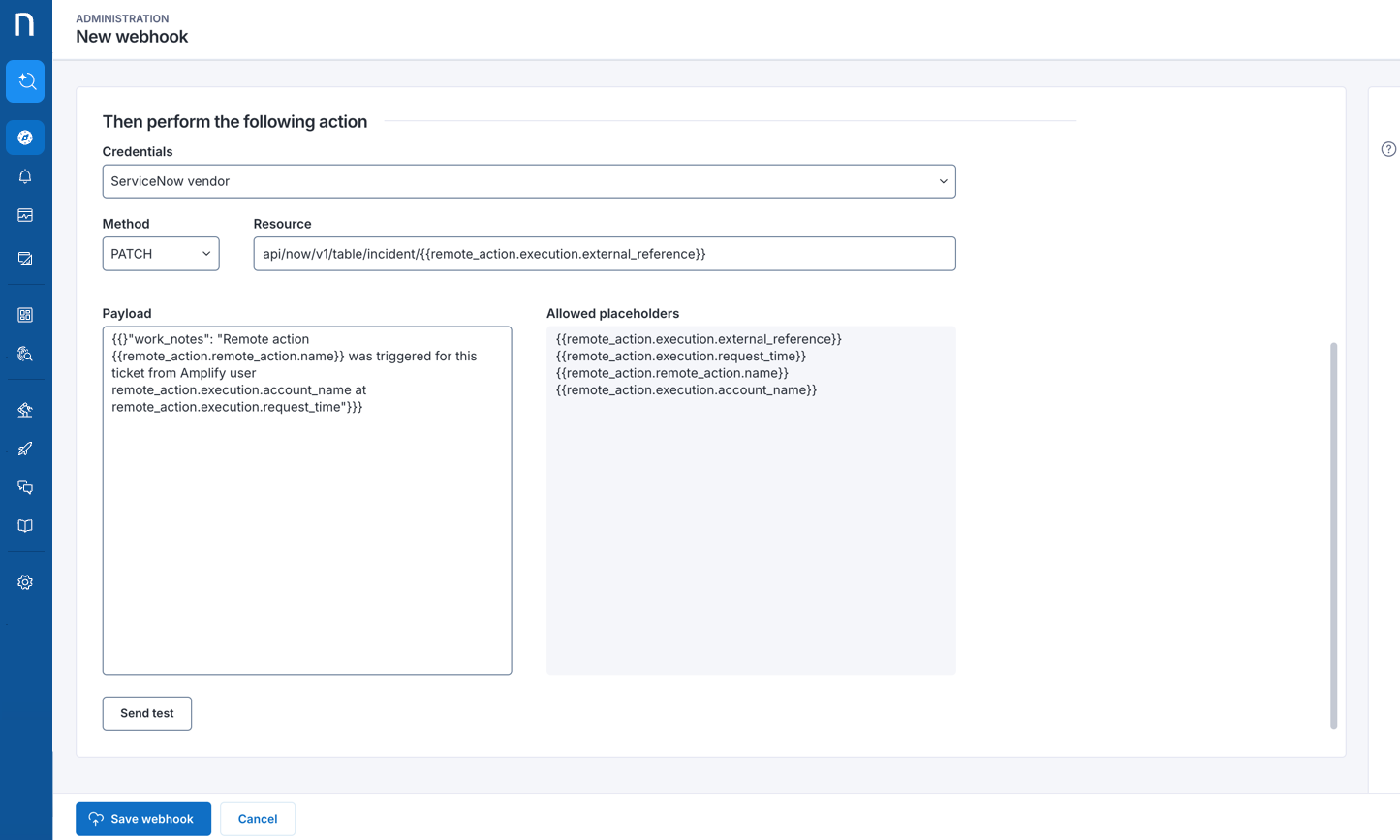
2. Select the [connector credential](/platform/configuring_nexthink/bringing-data-into-your-nexthink-instance/integrating-nexthink-with-third-party-tools/outbound-connectors/connector-credentials.md) you had previously set up for this webhook.
3. Select the PATCH option from the **Method** drop-down.
4. Insert the following API in the **Resource** field.

<table data-header-hidden><thead><tr><th width="186"></th><th></th></tr></thead><tbody><tr><td>Resource API<br>for remote action</td><td><pre><code>api/now/v1/table/incident/{{remote_action.execution.external_reference}}
</code></pre></td></tr><tr><td>Resource API<br>for workflow</td><td><pre><code>api/now/v1/table/incident/{{workflow.execution.external_reference}}
</code></pre></td></tr></tbody></table>

The `{{remote_action.execution.external_reference}}` and `{{workflow.execution.external_reference}}` are placeholders automatically filled with the ServiceNow ticket reference when the remote action or workflow is triggered from the Amplify extension.

Refer to the [F.A.Q](#updatingservicenowfromamplify-f.a.q) section at the bottom of this page for more information.

5. Insert **Payload**, use the following messages example:

<table data-header-hidden><thead><tr><th width="186"></th><th></th></tr></thead><tbody><tr><td>Payload for remote action</td><td><pre><code>{"work_notes": "Remote action {{remote_action.remote_action.name}} was triggered for this ticket from Amplify user {{remote_action.execution.account_name}} at {{remote_action.execution.request_time}}"}
</code></pre></td></tr><tr><td>Payload<br>for workflow</td><td><pre><code>{"work_notes": "Workflow {{workflow.workflow.name}} was triggered for this ticket from Amplify at {{workflow.execution.request_time"}}} 
</code></pre></td></tr></tbody></table>

6. For first-time configurations, **Save webhook** without testing and refer to the [Amplify](/platform/configuring_nexthink/bringing-data-into-your-nexthink-instance/deploying-nexthink-in-non-vdi-environment/configure-amplify.md#amplify-recordingremoteactionsinathird-partyitsupporttool-servicenowamplifyservicenow) documentation to run a remote action or workflow from Amplify in ServiceNow and check if the webhook works properly.
   * **Send test** does not successfully test the webhook until you trigger a remote action or workflow from Amplify in ServiceNow to create the incident reference value for the **Resource** placeholder `{{....}}`.
   * Refer to the [F.A.Q ](#how-do-i-manually-retrieve-the-servicenow-ticket-remote_action.execution.external_reference-value-to)section to manually retrieve the incident `remote_action.execution.external_reference` or `workflow.execution.external_reference` value from ServiceNow and test the webhook configuration.

{% hint style="info" %}
Refer to the [Amplify installation and configuration guide](/platform/configuring_nexthink/bringing-data-into-your-nexthink-instance/deploying-nexthink-in-non-vdi-environment/configure-amplify/installation-and-configuration.md) to learn about configuring Amplify to integrate Nexthink instances with web applications, and deploying the configuration details via Registry.
{% endhint %}

<figure><img src="/files/G4Tg6Ws1PGPIvz0OEufU" alt=""><figcaption></figcaption></figure>

### Update ServiceNow when a remote action or workflow is completed <a href="#updatingservicenowfromamplify-configuringwebhookstoupdateservicenowwhenaremoteactioniscompleted" id="updatingservicenowfromamplify-configuringwebhookstoupdateservicenowwhenaremoteactioniscompleted"></a>

Configure in Nexthink a webhook that automatically updates incident ticket logs in ServiceNow with the result details of a completed remote action or workflow.

Remember to first set up a [connector credential](#updatingservicenowfromamplify-configuringwebhookstoupdateservicenowwhenaremoteactionistriggered) for the webhook.

1. From the [webhook configuration page](/platform/configuring_nexthink/bringing-data-into-your-nexthink-instance/integrating-nexthink-with-third-party-tools/outbound-connectors/webhooks/managing-webhooks.md), insert the **NQL condition** below. Refer to the [Configuring webhook NQL conditions](/platform/configuring_nexthink/bringing-data-into-your-nexthink-instance/integrating-nexthink-with-third-party-tools/outbound-connectors/webhooks/managing-webhooks/configuring-webhook-nql-conditions.md#configuringwebhooknqlconditions-validnqlconditionsexamplesforalert-relatedwebhooksnqlconditionexampl) documentation for more examples.
   * After filling in the NQL Condition, the system lists the [allowed placeholders](/platform/configuring_nexthink/bringing-data-into-your-nexthink-instance/integrating-nexthink-with-third-party-tools/outbound-connectors/webhooks/managing-webhooks/configuring-webhook-fields_-method-resource-and-payload.md#configuringwebhookfields-method-resource-andpayload-usingdatamodelvariablesasplaceholdersinthepayloa) for the **Payload**.

<table data-header-hidden><thead><tr><th width="194"></th><th></th></tr></thead><tbody><tr><td>NQL condition<br>for remote action</td><td><pre><code>remote_action.executions
| where internal_source == "Amplify" 
  And external_reference != "undefined" 
  And external_source == "SNOW-Incident" 
  And status in [failure, success , expired] 
  and remote_action.nql_id != "undefined"
| list remote_action.name , 
  remote_action.execution.request_time, 
  remote_action.execution.time, 
  remote_action.execution.status, 
  remote_action.execution.status_details, 
  remote_action.execution.inputs, 
  remote_action.execution.outputs, 
  remote_action.execution.account_name, 
  remote_action.execution.external_reference
</code></pre></td></tr><tr><td>NQL condition<br>for workflow</td><td><pre><code>
workflow.executions
| where internal_source == "Amplify"
 And external_reference != "undefined" 
 And external_source == "SNOW-Incident" 
 And status in [failure, success, expired, cancelled] 
 And workflow.nql_id != "undefined"
| list workflow.name ,
 workflow.execution.request_time, 
 workflow.execution.time, 
 workflow.execution.status, 
 workflow.execution.status_details, 
 workflow.execution.inputs, 
 workflow.execution.outcome, 
 workflow.execution.external_reference
</code></pre></td></tr></tbody></table>

2. Select the [connector credential](/platform/configuring_nexthink/bringing-data-into-your-nexthink-instance/integrating-nexthink-with-third-party-tools/outbound-connectors/connector-credentials.md) you had previously set up for this webhook.
3. Select the PATCH option from the **Method** drop-down.
4. Insert the following API in the **Resource** field.

<table data-header-hidden><thead><tr><th width="186"></th><th></th></tr></thead><tbody><tr><td>Resource API<br>for remote action</td><td><pre><code>api/now/v1/table/incident/{{remote_action.execution.external_reference}}
</code></pre></td></tr><tr><td>Resource API<br>for workflow</td><td><pre><code>api/now/v1/table/incident/{{workflow.execution.external_reference}}
</code></pre></td></tr></tbody></table>

The `{{remote_action.execution.external_reference}}` and `{{workflow.execution.external_reference}}` are placeholders automatically filled with the ServiceNow ticket reference when the remote action or workflow is triggered from the Amplify extension.

Refer to the [F.A.Q](#updatingservicenowfromamplify-f.a.q) section at the bottom of this page for more information.

5. Insert **Payload**, use the following message example:

<table data-header-hidden><thead><tr><th width="186"></th><th></th></tr></thead><tbody><tr><td>Payload<br>for remote action</td><td><pre><code>{"work_notes":"Status of Remote action {{remote_action.remote_action.name}} triggered for this ticket from Amplify user {{remote_action.execution.account_name}} is as follows. \n Request time: {{remote_action.execution.request_time}} \n Execution time: {{remote_action.execution.time}} \n Status: {{remote_action.execution.status}} \n Status details: {{remote_action.execution.status_details}} \n Inputs: {{remote_action.execution.inputs.as(format = text)}} \n Outputs: {{remote_action.execution.outputs.as(format = text)}}"}
</code></pre></td></tr><tr><td>Payload<br>for workflow</td><td><pre><code>{ "work_notes": "Status of Workflow {{workflow.workflow.name}} triggered for this ticket from Amplify is as follows. Request time: {{workflow.execution.request_time}} Execution time: {{workflow.execution.time}} Status: {{workflow.execution.status}} Status details: {{workflow.execution.status_details}} Inputs: {{workflow.execution.inputs}} Outcome: {{workflow.execution.outcome"}}} 
</code></pre></td></tr></tbody></table>

6. For first-time configurations, **Save webhook** without testing and refer to the [Amplify](/platform/configuring_nexthink/bringing-data-into-your-nexthink-instance/deploying-nexthink-in-non-vdi-environment/configure-amplify.md#amplify-recordingremoteactionsinathird-partyitsupporttool-servicenowamplifyservicenow) documentation to run a remote action in Amplify from ServiceNow and check if the webhook works properly:
   * **Send test** does not successfully test the webhook until you trigger a remote action from Amplify in ServiceNow to create the incident reference value for the **Resource** placeholder `{{...}}`.
   * Refer to the [F.A.Q ](#how-do-i-manually-retrieve-the-servicenow-ticket-remote_action.execution.external_reference-value-to)section to manually retrieve the incident `remote_action.execution.external_reference` or `workflow.execution.external_reference` value from ServiceNow and test the webhook configuration.

{% hint style="info" %}
Refer to the [Amplify installation and configuration guide](/platform/configuring_nexthink/bringing-data-into-your-nexthink-instance/deploying-nexthink-in-non-vdi-environment/configure-amplify/installation-and-configuration.md) to learn about configuring Amplify to integrate Nexthink instances with web applications, and deploying the configuration details via Registry.
{% endhint %}

***

## F.A.Q <a href="#updatingservicenowfromamplify-f.a.q" id="updatingservicenowfromamplify-f.a.q"></a>

#### How do I check if Amplify updates the incident or interaction log in ServiceNow?

The [Amplify](/platform/configuring_nexthink/bringing-data-into-your-nexthink-instance/deploying-nexthink-in-non-vdi-environment/configure-amplify.md) documentation explains how to register remote actions and workflows in the ServiceNow log using the Amplify extension. That is, after following the webhook configuration described on this page.

#### What is the value of the `{{remote_action.execution.external_reference}}` and `{{workflow.execution.external_reference}}`placeholders in the Resource field?

The process behind the Amplify webhook consists of Amplify obtaining the `external_reference` value from the ServiceNow URL by reading a set of predefined ServiceNow URLs and matching to find the ticket `sys_id` and type (incident or interaction).

Then, Amplify sends this `external_reference` value along with the `remote_action` or `workflow` information to the Nexthink platform, and the webhook uses these values to replace the webhook **Resource** placeholder, e.g., `{{remote_action.execution.external_reference}}`.

#### How do I manually retrieve the ServiceNow `remote_action.execution.external_reference` value to test the webhook configuration?

After running a remote action in Amplify from the ServiceNow browser page:

1. Get the `external_reference` from the ServiceNow incident or interaction URL.

* URL example in workspace view:

<figure><img src="/files/mCQtxnvr6ycy0cQ4Fn6y" alt=""><figcaption></figcaption></figure>

* URL example in classic view:

<figure><img src="/files/dZ4XlXkWrMVQLCyBgQ63" alt=""><figcaption></figcaption></figure>

From the Nexthink [webhook configuration](#updatingservicenowfromamplify-configuringwebhookstoupdateservicenowwhenaremoteactionistriggered-1) page:

2. Replace the **Resource** placeholder `{{remote_action.execution.external_reference}}` with the manually retrieved `external_reference` from the ServiceNow URL. For example:

```
api/now/v1/table/incident/32dd789083xxxxxxxxxxxxxxxxxxxxx
```

3. **Send a test** to check the webhook configuration. After confirming the test is successful, replace the **Resource** with the correct placeholder and **Save webhook**:

```
api/now/v1/table/incident/{{remote_action.execution.external_reference}}
```

#### How do I see the ServiceNow incident or interaction `sys_id` in the Nexthink platform?

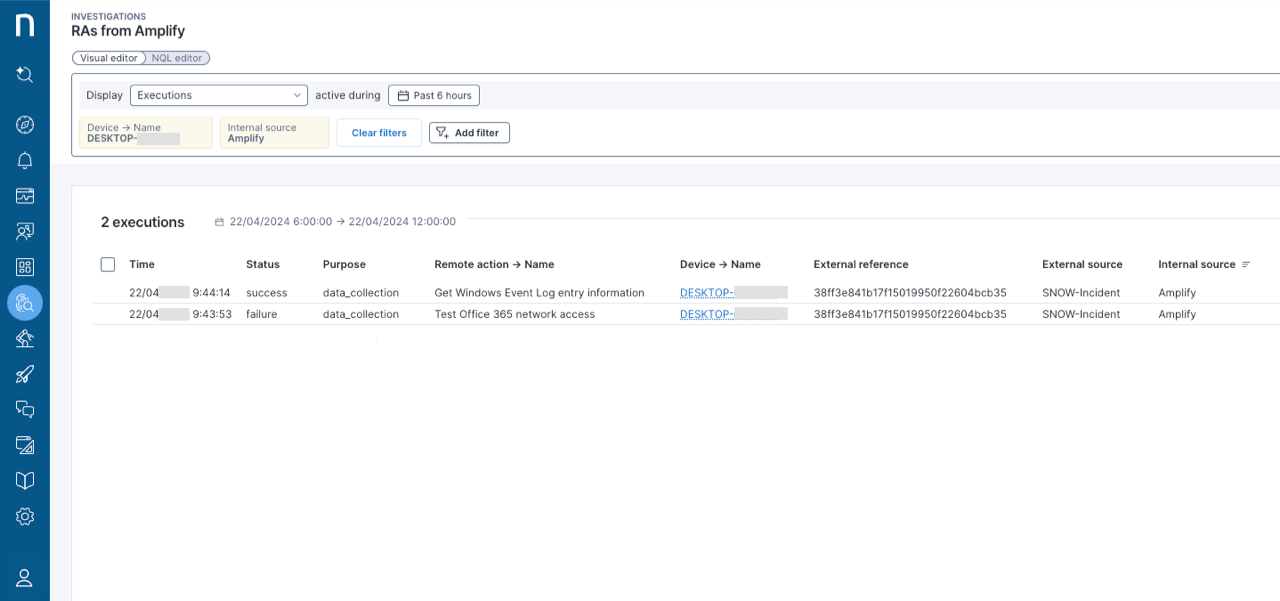
After following the webhook configuration described on this page and executing a remote action using the Amplify extension in ServiceNow, run the corresponding NQL query from the Investigations page in Nexthink to get the ticket `sys_id.`

Find the `sys_id` under **External reference** and the ticket type under **External source** (`external_source== "SNOW-Incident"` or `external_source== "SNOW-Interaction"`).

<figure><img src="/files/GGDgBUYH6bP6PvknDUM1" alt="Checking ServiceNow incident or interaction ID in the Nexthink platform."><figcaption></figcaption></figure>

***

RELATED TOPICS

* [Amplify](/platform/configuring_nexthink/bringing-data-into-your-nexthink-instance/deploying-nexthink-in-non-vdi-environment/configure-amplify.md)
* [Configuring Amplify for ServiceNow Agent Workspace](/platform/configuring_nexthink/bringing-data-into-your-nexthink-instance/deploying-nexthink-in-non-vdi-environment/configure-amplify/installation-and-configuration/integrating-amplify-with-web-applications/configuring-amplify-for-servicenow-agent-workspace.md)
* [Configuring Amplify for ServiceNow Operations Workspace](/platform/configuring_nexthink/bringing-data-into-your-nexthink-instance/deploying-nexthink-in-non-vdi-environment/configure-amplify/installation-and-configuration/integrating-amplify-with-web-applications/configuring-amplify-for-servicenow-operations-workspace.md)
* [Connector credentials](/platform/configuring_nexthink/bringing-data-into-your-nexthink-instance/integrating-nexthink-with-third-party-tools/outbound-connectors/connector-credentials.md)
* [Creating an incident in ServiceNow](/platform/configuring_nexthink/bringing-data-into-your-nexthink-instance/integrating-nexthink-with-third-party-tools/outbound-connectors/webhooks/webhook-use-cases-setup/creating-an-incident-in-servicenow.md)
* [Amplify installation and configuration](/platform/configuring_nexthink/bringing-data-into-your-nexthink-instance/deploying-nexthink-in-non-vdi-environment/configure-amplify/installation-and-configuration.md)
* [Managing webhooks](/platform/configuring_nexthink/bringing-data-into-your-nexthink-instance/integrating-nexthink-with-third-party-tools/outbound-connectors/webhooks/managing-webhooks.md)
* [Configuring webhook fields: Method, Resource, and Payload](/platform/configuring_nexthink/bringing-data-into-your-nexthink-instance/integrating-nexthink-with-third-party-tools/outbound-connectors/webhooks/managing-webhooks/configuring-webhook-fields_-method-resource-and-payload.md)
* [Configuring webhook NQL conditions](/platform/configuring_nexthink/bringing-data-into-your-nexthink-instance/integrating-nexthink-with-third-party-tools/outbound-connectors/webhooks/managing-webhooks/configuring-webhook-nql-conditions.md)


---

# Agent Instructions: Querying This Documentation

If you need additional information that is not directly available in this page, you can query the documentation dynamically by asking a question.

Perform an HTTP GET request on the current page URL with the `ask` query parameter:

```
GET https://docs.nexthink.com/platform/configuring_nexthink/bringing-data-into-your-nexthink-instance/integrating-nexthink-with-third-party-tools/outbound-connectors/webhooks/webhook-use-cases-setup/updating-servicenow-from-amplify.md?ask=<question>
```

The question should be specific, self-contained, and written in natural language.
The response will contain a direct answer to the question and relevant excerpts and sources from the documentation.

Use this mechanism when the answer is not explicitly present in the current page, you need clarification or additional context, or you want to retrieve related documentation sections.