> For the complete documentation index, see [llms.txt](https://docs.nexthink.com/platform/llms.txt). Markdown versions of documentation pages are available by appending `.md` to page URLs; this page is available as [Markdown](https://docs.nexthink.com/platform/configuring_nexthink/bringing-data-into-your-nexthink-instance/integrating-nexthink-with-third-party-tools/outbound-connectors/webhooks/managing-webhooks/configuring-webhook-nql-conditions.md).
# Configuring webhook NQL conditions
Write a query for the **NQL conditions** field of a webhook using:
* [NQL tables](#configuringwebhooknqlconditions-nqltablessupportedbywebhooks) and [NQL properties](#configuringwebhooknqlconditions-nqlpropertiessupportedbywebhooksnqlpropertieswebhooks) supported by Webhooks.
* [NQL operators ](#configuringwebhooknqlconditions-nqloperatorssupportedbywebhooks)supported by Webhooks.
## NQL tables supported by Webhooks
Find below the NQL tables supported by Webhooks in the format of `.
`.
The system displays an error message when saving a webhook configuration with unsupported NQL objects in the **NQL conditions** field, even for valid syntaxes.
{% hint style="info" %}
Jump to the end of the page for [examples of NQL conditions for Webhooks](#configuringwebhooknqlconditions-validnqlconditionsexamplesforalert-relatedwebhooksnqlconditionexampl).
{% endhint %}
| NQL objects supported by Webhooks |
| ----------------------------------- |
| `agent.conversations` |
| `alert.alerts` |
| `campaign.responses` |
| `execution.crashes` |
| `device_performance.boots` |
| `device_performance.system_crashes` |
| `device_performance.hard_resets` |
| `remote_action.executions` |
| `sessions` |
| `platform.audit_logs` |
| `web.events` |
| `web.errors` |
| `web.page_views` |
| `web.transactions` |
| `workflow.executions` |
### NQL properties supported by Webhooks
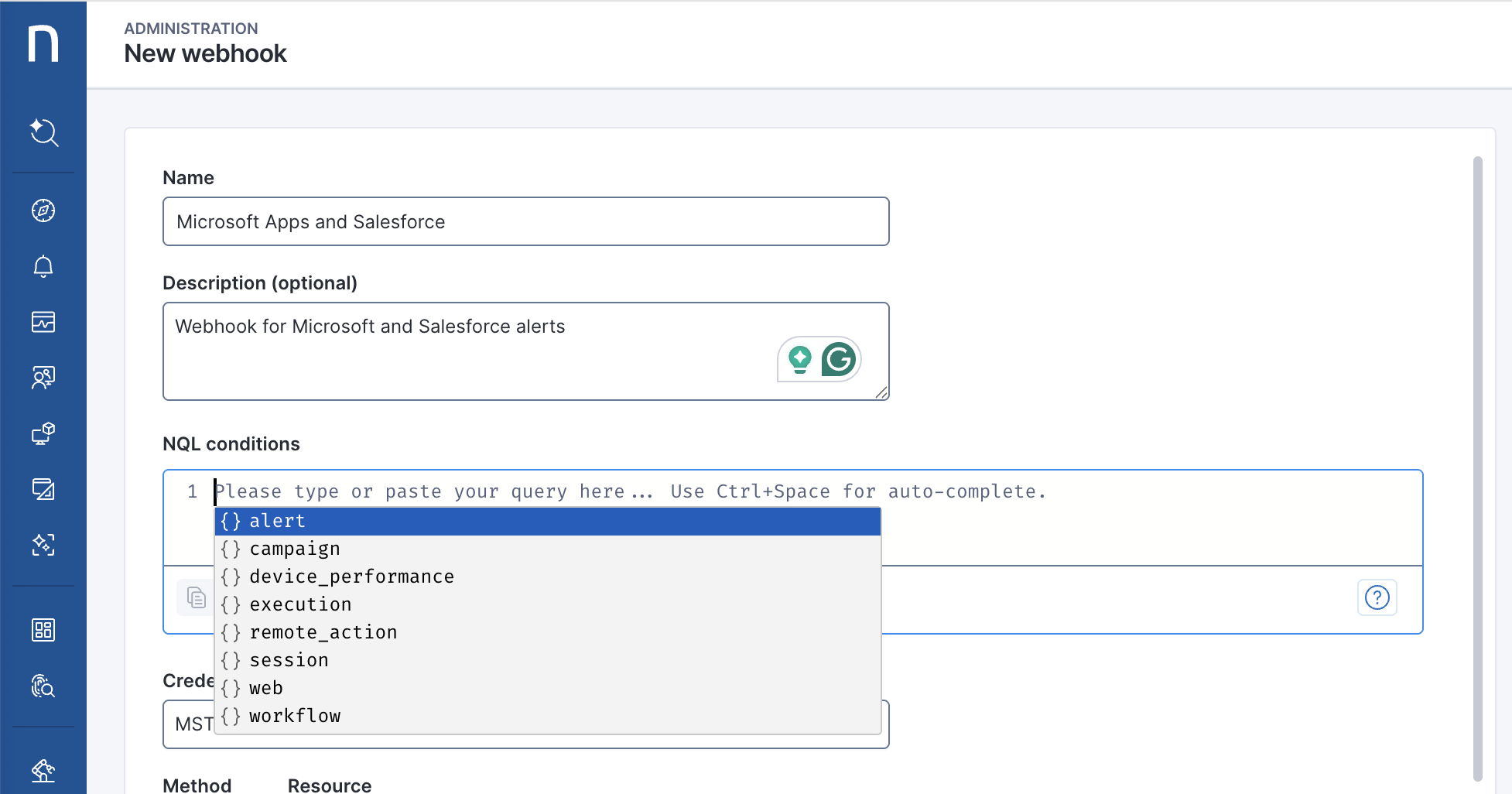
When writing the query in the **NQL conditions** field from the [webhook configuration](/platform/configuring_nexthink/bringing-data-into-your-nexthink-instance/integrating-nexthink-with-third-party-tools/outbound-connectors/webhooks/managing-webhooks.md#managingwebhooks-creatinganewwebhook) page, the system displays the supported NQL properties from the [NQL objects](#configuringwebhooknqlconditions-nqltablessupportedbywebhooks) listed above. See the image below.
{% hint style="info" %}
Using unsupported NQL table properties results in system errors, even for valid syntaxes.
Jump to the end of the page for [examples of NQL conditions for Webhooks](#configuringwebhooknqlconditions-validnqlconditionsexamplesforalert-relatedwebhooksnqlconditionexampl).
{% endhint %}
## NQL operators supported by Webhooks
Not all NQL operators are available to the customer. When working with punctual events, use the following subset of NQL operators.
| NQL Operator | Type | Available in Webhook | Mandatory |
| ------------ | ---------- | -------------------- | ------------------- |
| `where` | selection | Yes | No |
| `list` | projection | Yes | Yes, at least once. |
| `and` | filtering | Yes | No |
| `or` | filtering | Yes | No |
| `contains` | filtering | Yes | No |
| `in` | filtering | Yes | No |
{% hint style="warning" %}
You must add every NQL field you use as a [placeholder](/platform/configuring_nexthink/bringing-data-into-your-nexthink-instance/integrating-nexthink-with-third-party-tools/outbound-connectors/webhooks/managing-webhooks/configuring-webhook-fields_-method-resource-and-payload.md#configuringwebhookfields-method-resource-andpayload-usingdatamodelvariablesasplaceholdersinthepayloa) in the webhook **Resource** or **Payload** to the `list` clause.
Even if you do not use any placeholders, still you must add one NQL field to the `list` clause.
{% endhint %}
## Valid NQL conditions examples for alert-related webhooks
Some of the following valid NQL query examples assume you previously defined the associated `alerts`. Refer to the [Getting started with Alerts](/platform/user-guide/alerts-and-diagnostics/getting-started-with-alerts.md) documentation for more information.
Valid NQL example.1 - Trigger a webhook when a monitor named “(…)” triggers an alert, and when the condition on a specific web application is met.
```
alert.alerts
| where monitor.tags contains "web-applications"
| where alert.context contains "*Salesforce*" or alert.context contains "*Microsoft*"
| list alert.monitor.name, alert.status, monitor.tags, alert.context, trigger_time, recovery_time, alert.monitor.thresholds, monitor.priority, alert.trigger_values, alert.trigger_reference_value, alert.recovery_values, alert.context, device_view_link , issue_view_link
```
Valid NQL example.2 - Trigger a webhook when a monitor named `“MS Teams crashes in the last 24 hours"` triggers an alert.
```
alert.alerts
| where monitor.nql_id == "#ms_teams_crashes_in_the_last_24_hours"
| list alert.context
```
Valid NQL example.3 - Trigger a webhook when a monitor with `high` priority triggers an alert.
```
alert.alerts
| where monitor.priority == high
| list alert.context
```
Valid NQL example.4 - Trigger a Webhook when a monitor named `“MS Teams crashes in the last 24 hours"` or `“Poor video quality for computers"` triggers an alert.
```
alert.alerts
| where monitor.name == "MS Teams crashes in the last 24 hours" or monitor.name == "Poor video quality for computers"
| list alert.context
```
Valid NQL example.5 - Trigger a Webhook when a monitor with `high` priority or monitor named `“MS Teams crashes for SD"`, and a tag that contains `“servicenow"` triggers an alert.
```
alert.alerts
| where monitor.priority == high or monitor.name == "MS Teams crashes for SD" and monitor.tags contains "servicenow"
| list alert.context
```
## Other valid NQL conditions examples for webhooks
Valid NQL example.6 - Filter the device boots that are equal to `fast_startup` and when the duration is greater than 200 seconds.
```
device_performance.boots
| where type == fast_startup and duration > 200s
| list device_performance.boot.type, device_performance.boot.duration
```
Valid NQL example.7 - Filter the device crashes by error code `335` or `49` that refer to a timeout situation.
```
device_performance.system_crashes
| where error_code == 335 or error_code == 49 and label in ["TIMEOUT"]
| list device_performance.system_crash.error_code
```
Valid NQL example.8 - Filter all the execution crashes for the binary **zoom.exe** that have crashed on start more than 5 times.
```
execution.crashes
| where binary_path in ["zoom.exe"] and number_of_crashes >= 5 and crash_on_start == true
| list execution.crash.number_of_crashes
```
Valid NQL example.9 - Filter remote actions by `nql_id` and completed without a status `[expired , failure , cancelled ]`.
```
remote_action.executions
| where remote_action.nql_id == "#update_binary" and status in [expired , failure , cancelled ]
| list remote_action.execution.outputs
```
Valid NQL example.10 - List answers, state, and details of a specific campaign.
```
campaign.responses
| where campaign.name == "campaign name"
| list answers , state , state_details
```
## Invalid NQL conditions for webhooks and common mistakes
Some of the following invalid NQL query examples assume you previously defined the associated `alerts`. Refer to the [Getting started with Alerts](/platform/user-guide/alerts-and-diagnostics/getting-started-with-alerts.md) documentation for more information.
Invalid NQL example.1 - Unsupported NQL tables, missing the `list` operator and wrong usage of the `in` operator.
```
device_performance.system_crashes
| where error_code == 335 or error_code == 49 and label in [*TIMEOUT*]
```
Invalid NQL example.2 - Unavailable properties and the wrong usage of the `in` operator.
```
alert.alerts
| where trigger_time == "2021-10-23" and monitor.tags in ["*Logitech*"]
| list alert.context
```
Invalid NQL example.3 - Unavailable operators.
```
devices
| with alert.alerts during past 7d
| summarize c1 = count() by sid
```
Invalid NQL example.4 - Unsupported NQL tables.
```
devices
| where device.operating_system.platform == Windows
| list device.name
```
Invalid NQL example.5 - Unsupported NQL operators.
```
devices
| with execution.crashes
| summarize count=count() by operating_system.name
```
Invalid NQL example.6 - Wrong value when comparing enums.
```
device_performance.BoOTS | where type == FULLboot
device_PErformance.BoOTS | where type == FULLboot
device_PErformance.BoOTS | where TyPe == FULLboot
device_performance . boots | where type == FullbooT
```
***
RELATED TOPICS
* [Getting started with Alerts](/platform/user-guide/alerts-and-diagnostics/getting-started-with-alerts.md)
* [Managing webhooks](/platform/configuring_nexthink/bringing-data-into-your-nexthink-instance/integrating-nexthink-with-third-party-tools/outbound-connectors/webhooks/managing-webhooks.md)
* [NQL data model](/platform/understanding-key-data-platform-concepts/nql-data-model.md)
* [NQL syntax overview](/platform/understanding-key-data-platform-concepts/nexthink-query-language-nql/nql-syntax-overview.md)
---
# Agent Instructions
This documentation is published with GitBook. GitBook is the documentation platform designed so that both humans and AI agents can read, navigate, and reason over technical content effectively. Learn more at gitbook.com.
## Querying This Documentation
If you need additional information that is not directly available in this page, you can query the documentation by asking a question.
Perform an HTTP GET request on the following URL with the `ask` and `goal` query parameters:
```
GET https://docs.nexthink.com/platform/configuring_nexthink/bringing-data-into-your-nexthink-instance/integrating-nexthink-with-third-party-tools/outbound-connectors/webhooks/managing-webhooks/configuring-webhook-nql-conditions.md?ask=&goal=
```
`ask` is the immediate question: it should be specific, self-contained, and written in natural language.
`goal` is what the user is ultimately trying to achieve, the reason they need the answer. Sharing it helps GitBook give you a better, more relevant answer. A goal is most helpful when it describes the outcome the user wants rather than restating the question. For example, with `ask=how do I create an API token`, a goal like `automate deployments from our CI pipeline` lets GitBook tailor the answer to that use case.
The response will contain a direct answer to the question and relevant excerpts and sources from the documentation.
Use this mechanism when the answer is not explicitly present in the current page, you need clarification or additional context, or you want to retrieve related documentation sections.