> For the complete documentation index, see [llms.txt](https://docs.nexthink.com/llms.txt). Markdown versions of documentation pages are available by appending `.md` to page URLs; this page is available as [Markdown](https://docs.nexthink.com/configuring_nexthink/bringing-data-into-your-nexthink-instance/deploying-nexthink-in-non-vdi-environment/installing-collector/macos-collector-references/mac-collector-proxy-support.md).
# macOS Collector proxy support
## Overview
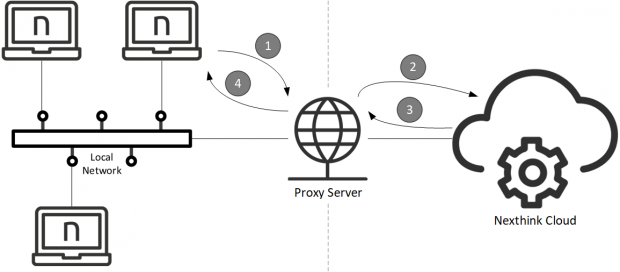
The devices in a corporate network typically connect to the Internet through a proxy server instead of using a direct connection. A proxy server, often simply referred to as a proxy, forwards the requests of client applications that run on corporate devices to the servers that run on the Internet, as if the proxy itself is initiating the requests. Then the proxy sends the responses from the servers back to the clients. By acting as an intermediary, a proxy server can provide varied functionality such as content filtering (for improved security) or content caching (for better performance).
Collectors inside a corporate network that is equipped with a proxy server are usually required to send their traffic through the proxy to reach the Nexthink instance. In this article, learn about the different types of proxies and configurations supported by Collector.
## Supported types of proxies
Collector supports the following types of proxies:
* **HTTP**
* **SOCKS5**
Collector should work out of the box with transparent proxies that automatically intercept network traffic going from the corporate network to the Internet. The client systems are not aware that their traffic is traversing a proxy.
## Supported proxy configurations
Collector for macOS supports the configuration of proxy settings at the application level. It does not get the proxy settings from the system but from its own custom configuration. Make sure to provide the proxy settings during the Collector [installation](/configuring_nexthink/bringing-data-into-your-nexthink-instance/deploying-nexthink-in-non-vdi-environment/installing-collector/installing-collector-on-macos.md).
### Collector custom configuration
To specify the proxy settings of the Collector at the application level during installation, select either one or both of the following methods:
* **Automatic proxy**\
Get a PAC file from the specified URL to automatically determine the proxy settings. A proxy-auto-config (PAC) file is a JavaScript file with a single function that determines which proxy should be used for each client connection.
* **Manual proxy**\
Manually provide the address and port of the proxy.
## Collector logic to choose proxy settings
Collector for macOS selects one method to get its proxy settings on a trial and error basis. Collector tests the validity of each method in sequence: the first method that yields a set of proxy settings which allows Collector to connect to the Nexthink instance is kept. Methods are tried in the following order until one of them is successful:
1. If selected, try automatic configuration.
* Retrieve the PAC file, execute and determine the proxy.
2. If selected, try manual configuration.
3. Direct connection without proxy.
***
RELATED TASK
* [Installing the Collector on macOS](/configuring_nexthink/bringing-data-into-your-nexthink-instance/deploying-nexthink-in-non-vdi-environment/installing-collector/installing-collector-on-macos.md)
---
# Agent Instructions
This documentation is published with GitBook. GitBook is the documentation platform designed so that both humans and AI agents can read, navigate, and reason over technical content effectively. Learn more at gitbook.com.
## Querying This Documentation
If you need additional information that is not directly available in this page, you can query the documentation by asking a question.
Perform an HTTP GET request on the following URL with the `ask` and `goal` query parameters:
```
GET https://docs.nexthink.com/configuring_nexthink/bringing-data-into-your-nexthink-instance/deploying-nexthink-in-non-vdi-environment/installing-collector/macos-collector-references/mac-collector-proxy-support.md?ask=&goal=
```
`ask` is the immediate question: it should be specific, self-contained, and written in natural language.
`goal` is what the user is ultimately trying to achieve, the reason they need the answer. Sharing it helps GitBook give you a better, more relevant answer. A goal is most helpful when it describes the outcome the user wants rather than restating the question. For example, with `ask=how do I create an API token`, a goal like `automate deployments from our CI pipeline` lets GitBook tailor the answer to that use case.
The response will contain a direct answer to the question and relevant excerpts and sources from the documentation.
Use this mechanism when the answer is not explicitly present in the current page, you need clarification or additional context, or you want to retrieve related documentation sections.